

Japan Shopping Assistant!
2 ratings
)
Overview
Search Japanese marketplaces, translate keywords, save searches, and open supported items through your selected purchasing agent.
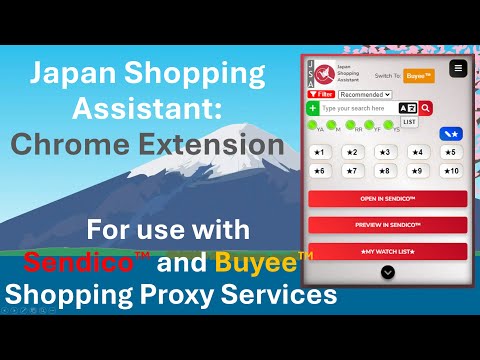
JSA 2.2 - Big Visual Update + Added Features + Marketplaces + Tutorial Japan Shopping Assistant helps collectors, resellers, and Japan-market shoppers search Japanese marketplaces faster, translate keywords, save reusable searches, and open supported item pages through a selected Purchasing Agent-shopping workflow. Search directly on Japanese marketplace websites, find the item you want, then open or preview supported item pages through your chosen Purchasing Agent service. Main features: - Search Japanese marketplace sites from one popup - Translate English search terms into Japanese before searching - Save reusable search keywords - Reopen saved keywords from the built-in List - Sort supported search results with filter options - Open supported item pages through the selected Purchasing Agent workflow - Preview supported item pages in a compact popup window - Use right-click context menu actions on supported product links - Use keyboard shortcuts for faster workflows - Save favorite shortcut buttons for frequently used pages or searches - Use light mode, dark mode, and Small, Medium, or Large popup sizes - Use hover tips and the built-in tutorial to learn the workflow - Try premium tools with a 30-day trial Comparison search buttons are for research and price checking. They do not open through Japanese Purchasing Agent services. The popup uses service-colored controls so you can quickly see which Purchasing Agent workflow is currently selected. Search, translate, filter, and save keywords: JSA includes a search workflow designed for repeated Japan-shopping searches. You can type in English or Japanese, translate English search terms into Japanese, choose marketplaces, apply filter options, and save keywords for later. Saved Japanese keywords can also show their English meaning on hover. Open, Preview, and Watch List: When you are on a supported item page, JSA can open or preview that item through the selected Purchasing Agent workflow. Open sends the item to the selected Purchasing Agent service in a Chrome tab. Preview opens it in a compact preview window. My Watch List opens the selected Purchasing Agent service’s saved or watched items page when supported. Right-click context menu: When browsing supported marketplace pages, you can right-click a supported product link, choose Japan Shopping Assistant, and open or preview the item through your selected Purchasing Agent workflow without manually visiting the item page first. Keyboard shortcuts: - Alt+Q opens the Japan Shopping Assistant popup - Alt+O opens the current supported item in the selected Purchasing Agent workflow - Alt+P previews the current supported item in a popup window If a shortcut does not work immediately after installing or updating, Chrome may have preserved an older shortcut setting or blocked a shortcut conflict. Open chrome://extensions/shortcuts to edit shortcuts manually. Favorite shortcut buttons: JSA includes favorite shortcut buttons for saving frequently used pages or searches. Buttons 1-5 are enabled by default, and buttons 6-10 can be enabled as an additional row. Important support notes: Marketplace and Purchasing Agent websites can change how their pages work, so support can vary over time. Mercari purchasing support: - Buy Now item pages are supported through the listed Purchasing Agent workflows. - Auctions currently work most reliably through Doorzo and are not yet supported by the other Purchasing Agent services. - Amazon Japan support is intended for standard Amazon product URLs. - Some marketplaces may require you to be signed into the marketplace or Purchasing Agent service in Chrome. - Facebook Marketplace searches require Facebook access in your browser. Japan Shopping Assistant is an independent Chrome extension. It is not created by, endorsed by, sponsored by, or affiliated with the marketplace or Purchasing Agent services named in this listing. All trademarks belong to their respective owners. If you would like specific features or other marketplaces added in Japan, the United States, or possibly other countries, please let me know in the Feedback tab in the extension’s options page.
3 out of 52 ratings
Details
- Version2.2.1
- UpdatedAugust 30, 2026
- Offered byquest.4.best.life
- Size14.58MiB
- LanguagesEnglish (United States)
- Developer
Email
quest.4.best.life@gmail.com - Non-traderThis developer has not identified itself as a trader. For consumers in the European Union, please note that consumer rights do not apply to contracts between you and this developer.
Privacy

This developer declares that your data is
- Not being sold to third parties, outside of the approved use cases
- Not being used or transferred for purposes that are unrelated to the item's core functionality
- Not being used or transferred to determine creditworthiness or for lending purposes
Support
For help with questions, suggestions, or problems, please open this page on your desktop browser