

Click Censor
평점 2개
)
개요
Censor a selected text on the whole page with a right click
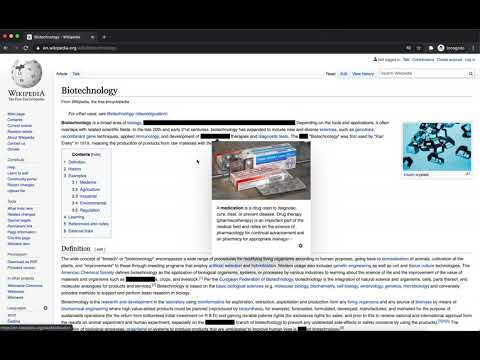
Censor text throughout the page with a click of a mouse. Temporarily hide / censor all instances of a word or a sentence: 1. Select the text. 2. Right click. 3. Select "Hide Selected Text". To unhide / uncensor the text again: 1. Right click on the hidden text. 2. Select "Unhide Selected Text". Features: - Hide / unhide selected text with an option in the context menu (right-click menu). - Hides all instances of the selected text on the whole page. - Censored text cannot be revealed accidentally by selecting or copying. - Hide what you need when you need it - no need to set a list of censored words in the settings. Useful for: - Studying and Learning - Hide the answer to test your knowledge. Reveal once you've answered the question. Learn directly from the source, no need to copy-paste. - Screenshots / Screen capture / Screen recording - Hide sensitive information quickly.
5점 만점에 3점평점 2개
세부정보
- 버전1.0.1
- 업데이트됨2020년 10월 9일
- 제공Juro Oravec
- 크기19.71KiB
- 언어English
- 개발자Juro Oravec
Flat 26 Shelley Court London N4 3DN United Kingdom이메일
juraj.oravec.josefson@gmail.com - 비판매자판매자로 식별되지 않은 개발자입니다. 유럽 연합에 거주하는 소비자의 경우, 이 개발자와 체결한 계약에 대해서는 소비자 권리가 적용되지 않을 수 있음을 유의해야 합니다.
개인정보 보호

지원
질문, 제안 또는 문제와 관련하여 도움이 필요하시면 개발자의 지원 사이트를 방문하세요.