


Overview
Automatic time tracking and timesheets for remote teams. Counts work hours in Chrome during your schedule. No screenshots.
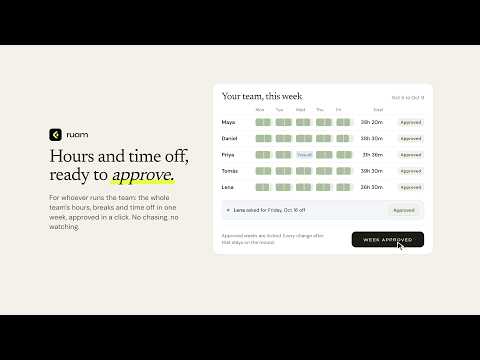
Ruam is an automatic time tracker and timesheet app for remote teams. It counts your work hours in Chrome during your schedule, so timesheets are right without a timer to start or stop, and without screenshots or keystroke logging. Your hours, counted for you - Ruam starts and stops with your work schedule. No schedule? It counts from Start my day to End my day. - The Ruam button in your toolbar shows today's hours at a glance. See where your day went - Every site and ticket you worked on, sorted into your day on its own. - It is private to you. Your team sees your hours, and you choose what else to share. Every hour on the right project - Pick the project right in Ruam. - Ticket numbers you have open are noted beside your time, so the week adds up without a spreadsheet. Honest answers about time away - When you step away, Ruam asks what that time was when you come back: I was away, It was a break, or I was working. - Time you say you worked counts up to your team's limit. Anything more goes to an admin to approve. For whoever runs the team - Employee time tracking without watching anyone: the whole team's hours, breaks and time off for the week, approved in a click. - Approved weeks are locked, and every change after that stays on the record. What Ruam never does - Never takes screenshots, never records keystrokes and never reads what is on the page. - Never counts outside your work hours. Incognito windows are never tracked. - Page titles stay private to you and are deleted after 30 days. Sites marked "do not track" are never recorded. Getting started 1. Ruam works with a Ruam team account. Team owners get started at ruam.ai. 2. Install Ruam and sign in. The welcome page connects the extension for you. 3. Pin Ruam to your toolbar and work as usual. Ruam is made by Kratuva Inc.
0 out of 5No ratings
Details
- Version0.6.2
- UpdatedOctober 29, 2026
- Size188KiB
- LanguagesEnglish (United States)
- DeveloperKratuva Inc.Website
131 Continental Dr Suite 305 Newark, DE 19713 USEmail
support@kratuva.comPhone
+91 87775 37956 - TraderThis developer has identified itself as a trader per the definition from the European Union and committed to only offer products or services that comply with EU laws.
Privacy

Ruam: Automatic Time Tracker for Remote Teams has disclosed the following information regarding the collection and usage of your data. More detailed information can be found in the developer's privacy policy.
Ruam: Automatic Time Tracker for Remote Teams handles the following:
This developer declares that your data is
- Not being sold to third parties, outside of the approved use cases
- Not being used or transferred for purposes that are unrelated to the item's core functionality
- Not being used or transferred to determine creditworthiness or for lending purposes
Support
For help with questions, suggestions, or problems, visit the developer's support site