

Atelier Seating - Wedding Seating Chart Maker

Overview
Drag-and-drop wedding seating chart maker with floor plan and place cards. Works offline. Import guests, manage tables, export CSV.
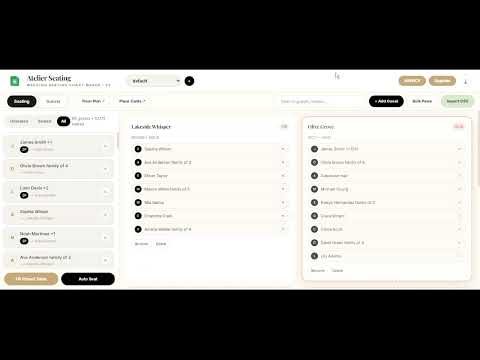
Atelier Seating – Wedding Seating Chart Maker | Drag & Drop, Floor Plan & Place Cards The most beautiful, fast, and offline wedding seating chart maker for wedding planners, brides, and venues. No lag. No monthly fees. No data leaving your device. Designed for real weddings – from intimate 50-guest celebrations to 500+ guest luxury events. WHAT YOU CAN DO: 1. SEATING BOARD (Visual Drag & Drop) Drag & drop guests between tables – instant, buttery smooth Pin VIPs, lock family tables, mark dietary / special needs Import guests via CSV – names, party size, group, table assignment Smart Auto-Seat – automatically fills tables respecting groups and party size Fill Pinned Table – one click to fill any table 50 realistic sample guests included to test everything Undo, search, filter by seated/unseated, table capacity indicators Wedding switcher – manage unlimited weddings (Agency) 2. FLOOR PLAN DESIGNER Place tables on a visual floor plan canvas Drag tables, dance floor, DJ, bar, entrance See your entire room layout at a glance Export floor plan to PDF for venue and caterer 3. PLACE CARDS DESIGNER – 3 Luxury Styles Classic Gold: Timeless serif, gold divider, black T-badge – as seen in luxury weddings Floral Script: Lush watercolor florals top & bottom, Dancing Script name, escort-style Luxe Minimal: Clean double-border gold frame, modern editorial look Features: Guest name, Table name, Table number badge (T1, T2...) bottom-right Options: Search guests, show only seated, expand party (1 guest → 4 cards) Export high-res PDF – 2 cards per row, no clipping, print-ready 300dpi 4. OFFLINE & PRIVATE Everything stored in chrome.storage.local on YOUR computer No account needed, no cloud, no tracking Works offline – perfect for venues with poor WiFi Lightning fast even with 500+ guests WHO IS IT FOR? Wedding planners who need to create and share seating charts quickly Brides & grooms DIYing their wedding Venues, hotels, caterers Event designers HOW IT WORKS (60 seconds): Click extension icon → Open Atelier Seating Import CSV or add guests manually Create tables (round, banquet, etc.) Drag guests to tables or click Auto-Seat Open Floor Plan to arrange room Open Place Cards → Choose style → Download PDF Send PDFs to printer, venue, and client PRICING – Lifetime, No Subscription: FREE – $0: 50 guests, 3 tables – design everything, test all features PREMIUM – $27 Lifetime: Unlimited guests, unlimited tables, 1 wedding, all exports (PDFs) AGENCY – $67 Lifetime: Everything in Premium + unlimited weddings, client management, priority support Activate with license key: TEST-PREMIUM or TEST-AGENCY for demo WHY ATELIER vs Others? Other tools: $15-29/month, slow, ugly, watermark Atelier: One-time $27, beautiful, fast, offline, no watermark, luxury place cards Built by wedding planners, for wedding planners PERMISSIONS EXPLAINED: storage: Save your seating charts locally – we never send your data anywhere host_permissions for Stripe: To verify your license securely SUPPORT: Need help? Email us or use in-app chat. Agency users get same-day support. Install Atelier Seating now and create a flawless seating chart in under 10 minutes. Lifetime deal – install today.
5 out of 53 ratings
Details
- Version2.0.7
- UpdatedOctober 3, 2026
- Size201KiB
- LanguagesEnglish (United States)
- DeveloperSharif Mohammad ShohelWebsite
Kashimpur Kashimpur, Gazipur City Corporation Gazipur 1346 BDEmail
aisofiyaworld@gmail.comPhone
+880 1776-606690 - TraderThis developer has identified itself as a trader per the definition from the European Union and committed to only offer products or services that comply with EU laws.
Privacy

This developer declares that your data is
- Not being sold to third parties, outside of the approved use cases
- Not being used or transferred for purposes that are unrelated to the item's core functionality
- Not being used or transferred to determine creditworthiness or for lending purposes
Support
For help with questions, suggestions, or problems, visit the developer's support site