

isTabs - Visual Tab Manager & Tab Search
40 ratings
)
Overview
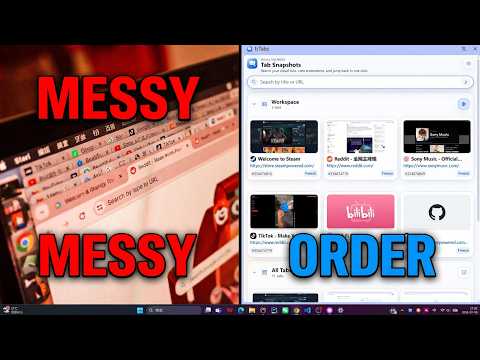
View every tab at a glance. Use shortcuts to return to the previous tab or switch quickly between frequently used tabs.
## isTabs — Visual Tab Manager & Tab Search for Chrome isTabs gives you a clear visual view of your open tabs in Chrome’s side panel. Find the page you need faster, move between frequently used tabs with shortcuts, and keep browsing organized without leaving your current page. --- ## ⚡ Key Features ### Visual Tab Overview See all open tabs in one place with page previews, titles, favicons, and URLs. ### Fast Tab Search Search tabs by title, URL, or domain. Use `/` for OR searches and `&` for AND searches to narrow results faster. ### Keyboard Tab Switching Use a shortcut to return to the previously used tab, or quickly cycle through your saved tab tray. ### Tab Tray Add frequently used tabs to a dedicated tray for quick access. Click to open a tab and right-click to remove it. ### Browser History View, search, open, and manage browser history directly from the side panel. History permission is requested only when you use this feature. ### Screenshot Previews View larger page previews while browsing tabs and history, making similar tabs easier to distinguish. ### Resource Sync Sync screenshot resources manually or automatically when enabled, so visual previews can stay available across sessions. ### Flexible Interface Choose your preferred tab list size, side panel position, preview behavior, language, and cache options. --- ## 🚀 Built for People Who Work With Many Tabs isTabs is useful for: - Developers switching between projects, documentation, and dashboards - Designers managing references and design tools - Researchers comparing many sources - Students organizing study materials - Anyone who keeps lots of tabs open every day --- ## 🎯 Why isTabs? Tabs are easy to open and hard to manage. isTabs makes them easier to find and switch between by combining visual browsing, search, shortcuts, history access, and a quick-access tab tray in one side panel. Open fewer duplicate tabs. Find the right page faster. Keep your workflow moving.
5 out of 540 ratings
Details
- Version2.1.8
- UpdatedOctober 1, 2026
- Offered byisTabs
- Size420KiB
- Languages9 languages
- Developer西航港大道中一段 长江路3端 成都市, 四川省 610000 CN
Email
war127428@gmail.com - Non-traderThis developer has not identified itself as a trader. For consumers in the European Union, please note that consumer rights do not apply to contracts between you and this developer.
Privacy

This developer declares that your data is
- Not being sold to third parties, outside of the approved use cases
- Not being used or transferred for purposes that are unrelated to the item's core functionality
- Not being used or transferred to determine creditworthiness or for lending purposes
Support
For help with questions, suggestions, or problems, please open this page on your desktop browser