


Overview
Zero-knowledge autofill for passwords, TOTP, cards & identities. AES-256 encrypted — your master password never leaves your device.
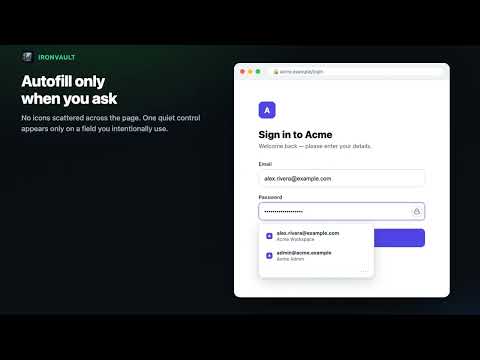
IronVault Secure Autofill is the browser companion to your IronVault vault. It offers matching credentials only after you focus a supported sign-in or form field, saves new credentials after a likely successful sign-in, and offers to update changed passwords. It fills passwords, one-time codes, cards, and identities, and captures selected text as a Quick Note only when you ask it to. Your vault is encrypted with AES-256-GCM after local key derivation. Version 4.11.0 can read strict Argon2id vault envelopes while normal writes remain PBKDF2-SHA-256 at 600,000 iterations during compatibility staging. Your master password is processed locally and is never transmitted or stored by IronVault. Encrypted vault data can sync between your IronVault devices; IronVault cannot read the plaintext credentials in that vault. Highlights in 4.11.0 • Calm, contextual autofill: no icons scattered across pages. One discreet control appears only after interaction with a relevant field. • Smarter real-site detection across complex login, signup, checkout, identity, OTP, iframe, Shadow DOM, and single-page app flows. • Save versus update prompts after likely successful authentication, with duplicate protection and no prompt after failed sign-ins. • Revision-aware encrypted saves so a newer vault change is not silently overwritten. • User-invoked Quick Note, bookmark, API key, subscription, card, identity, and 2FA capture. • Keyboard navigation and dismissal controls. • Passkey creation and sign-in backed by the encrypted vault where supported. • Automation protection disables listing, filling, copying, generation, and saving while browser automation is detected. IronVault does not sell data, use advertising trackers, or load remote code. It reads the focused page only to detect, fill, save, or update the action you request. A free IronVault account is required at ironvault.app.
0 out of 5No ratings
Details
- Version4.11.0
- UpdatedAugust 22, 2026
- Size173KiB
- LanguagesEnglish (United States)
- DeveloperWebsite
Email
support@ironvault.app - Non-traderThis developer has not identified itself as a trader. For consumers in the European Union, please note that consumer rights do not apply to contracts between you and this developer.
Privacy

IronVault — Secure Autofill has disclosed the following information regarding the collection and usage of your data. More detailed information can be found in the developer's privacy policy.
IronVault — Secure Autofill handles the following:
This developer declares that your data is
- Not being sold to third parties, outside of the approved use cases
- Not being used or transferred for purposes that are unrelated to the item's core functionality
- Not being used or transferred to determine creditworthiness or for lending purposes
Support
For help with questions, suggestions, or problems, visit the developer's support site