

CallByClick — click-to-call for dispatchers

Overview
Click any phone number on DAT or any page and your Polycom desk phone dials it — from the line you choose.
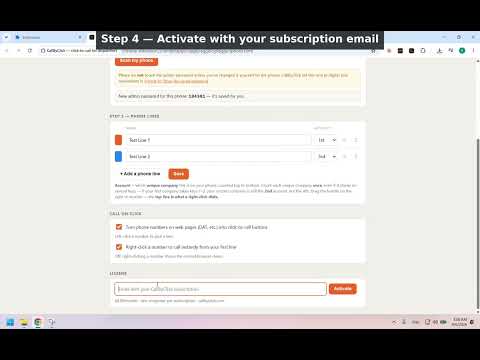
CallByClick is for freight dispatchers and anyone who runs more than one authority from a desk phone. Stop punching ten digits off a load board — click the number and your desk phone dials it. Every phone number on DAT (or any web page) becomes a button. Left-click it and a small card shows your company lines — Star Trucking, Load&Go, Royal — each labeled with its MC. Click one, and your Polycom desk phone goes off-hook and dials, hands-free. Right-click a number and it dials instantly from your first line, no card at all. WHAT IT DOES - Turns phone numbers on DAT and any website into click-to-call buttons. - Left-click → pick the company line to call from. Right-click → instant call from your first line. - One line per company on your phone, color-coded, drag to reorder. - Numbers with extensions (x2000) are recognized and shown. - Manual dial from the toolbar — and the last number you dialed stays there, so you can call a broker back even after their post is gone. - On/off switches for the click-to-call layer and for right-click instant dial. EASIEST SETUP THERE IS Install the free helper (one double-click). Open the extension: it finds your phone on the office network by itself, sets it up — including changing the factory default password and turning on the phone's API — and shows you what it did. Add your lines. Done. No IP hunting, no phone menus, no IT guy. HOW IT WORKS CallByClick talks directly to your Polycom VVX desk phone over your own office network, using the phone's built-in API — no new phone system, no phone company in the middle. A small free Windows helper (one double-click to install) is what lets the extension reach the phone. WORKS WITH Polycom VVX desk phones running UC Software 5.4 or newer — we test on a VVX 410. Newer Poly desk and conference phones that share the same REST API should also work, though we haven't tested them ourselves. Phones without that API (older SoundPoint and SoundStation models, the Poly Edge B line, or any phone running in Microsoft Teams / Zoom mode) are not supported. Your 5 free calls tell you before you pay. TRY IT FREE, THEN SUBSCRIBE Your first 5 calls are free — no card, no email — so you know it works with your phone before you pay. Then it's $12.99/month for one computer, and that includes Diversimail (our one-email-many-senders tool). Subscribe at callbyclick.com and activate in the extension with the email you paid with — no license keys to keep track of. PRIVACY FIRST The extension reads numbers on the page locally; the helper talks only to your phone on your local network. No call records, no tracking. The only thing sent to us is the email you activate with, to confirm your subscription. REQUIREMENTS Windows 10/11 · a Polycom VVX desk phone (UC Software 5.4+) on the same network · the free CallByClick helper from callbyclick.com Learn more at https://callbyclick.com
0 out of 5No ratings
Details
- Version1.0.9
- UpdatedSeptember 21, 2026
- FeaturesOffers in-app purchases
- Offered byEmpyrean Walker
- Size42.71KiB
- LanguagesEnglish
- Developer
Email
contact@diversimail.com - Non-traderThis developer has not identified itself as a trader. For consumers in the European Union, please note that consumer rights do not apply to contracts between you and this developer.
Privacy

CallByClick — click-to-call for dispatchers has disclosed the following information regarding the collection and usage of your data. More detailed information can be found in the developer's privacy policy.
CallByClick — click-to-call for dispatchers handles the following:
This developer declares that your data is
- Not being sold to third parties, outside of the approved use cases
- Not being used or transferred for purposes that are unrelated to the item's core functionality
- Not being used or transferred to determine creditworthiness or for lending purposes
Support
For help with questions, suggestions, or problems, visit the developer's support site