

EMP - ⌘+Enter to Unsubscribe
1 rating
)
Pangkalahatang-ideya
more like NO-tifications, amiright?
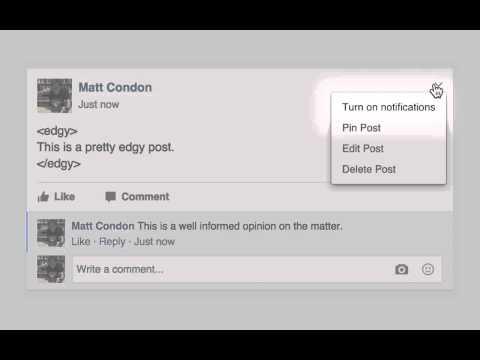
4 Simple steps to achieve Facebook nirvana: 1) Install EMP. 2) Fire off your comment with ⌘-Enter (Ctrl-Enter on Windows/Linux) to unsubscribe. 3) Appreciate the delicate fades of the EMP icon. 4) Enjoy your newfound peace and quiet. Maybe take up birdwatching? If you want to re-subscribe to a post (why tho), you can do so through its dropdown menu. --- You’re having a leisurely scroll through The Facebook, when you come across a seriously edgy post. It’s highly opinionated; it’s shocking and provocative. You should probably sit this one out. Obviously, you can’t resist throwing yourself into the brewing shitstorm. Or you might see a friend’s post, and think of a “hilarious” joke. It’s really important that everyone sees how funny you are, but they’re friends with tons of people you don’t know. You don’t really want to hear their funny jokes. Finally, our least likely situation: someone asks a question, and you provide a helpful, succinct answer. Unless you’re tagged for a follow-up question, you don’t really care what anyone else has to say on the matter. Normally, following all these scenarios, your notifications would be mercilessly carpet bombed. However, you’re different. You had EMP installed, and you were prepared. You submitted your comments on these posts by pressing ⌘-Enter, automagically unsubscribing yourself from notifications. Nice. EMP, by hi-lite
5 sa 51 rating
Mga Detalye
- Bersyon1.0.3
- Na-updateAgosto 28, 2015
- Iniaalok ngMatt Condon
- Laki40.44KiB
- Mga WikaEnglish
- Hindi traderHindi tinukoy ng developer na ito ang sarili bilang trader. Para sa mga consumer sa European Union, pakitandaang hindi naaangkop ang mga karapatan ng consumer sa mga kontrata sa pagitan mo at ng developer na ito.
Privacy

Suporta
Para sa tulong sa mga tanong, suhestyon, o problema, pakibuksan ang page na ito sa iyong desktop browser