

Prepped – Meeting Preparation for Google Meet

Overview
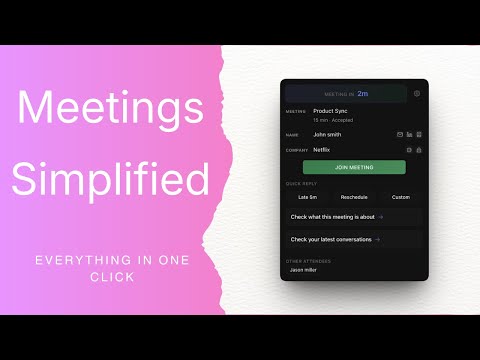
Meeting preparation Chrome extension for Google Meet with persistent reminders, Gmail context, CRM search, notes and more.
Prepped – Meeting Preparation for Google Meet Join every Google Meet prepared — even when you only have 30 seconds. Prepped is a meeting preparation Chrome extension for Google Meet and Google Calendar. It gives you persistent Outlook-style meeting reminders and a pre-call sidebar with Gmail context, CRM search, and company news—so you never scramble before a call again. Whether you’re running sales calls, client meetings, interviews, or demos, Prepped makes sure the right context is always in front of you. 🚀 Why use Prepped? Never Miss a Meeting (Outlook-Style Reminders) Chrome notifications disappear too fast. Prepped shows persistent meeting reminders that stay on screen until you dismiss them—so you never miss a meeting or join unprepared. Instant Meeting Context See recent Gmail email history, meeting agenda, attendees, and company details before every Google Meet. Stop the Tab Scramble No more switching between Gmail, LinkedIn, Crunchbase, or your CRM while others wait. All your pre-call context lives in one sidebar. Built for Sales & High-Stakes Calls Use CRM search, company news, funding info, and quick notes to stay sharp on sales calls and customer meetings. ✨ Key Features Persistent Meeting Alerts (Outlook-style) Google Calendar Integration Google Meet Sidebar Recent Gmail Email Context CRM Search Company News & Funding Info Meeting Notes & Follow-ups Quick Email Replies 🔒 Privacy-First (No Bots, No Recording) Prepped is built with privacy in mind: ❌ No call recording ❌ No meeting bots ❌ No email storage ✅ Email content is accessed only from emails you open ✅ All processing happens locally in your browser You stay in control at all times. 💡 Pricing Prepped includes a free version you can use forever. All new users get a 14-day Pro trial with full access to notes, CRM search, and research tools. After the trial, you can keep using the free version or upgrade to Pro if it helps your workflow. Perfect for: Sales reps • Founders • Recruiters • Consultants • Anyone with frequent Google Meet calls
5 out of 53 ratings
Details
- Version1.0.4
- UpdatedFebruary 13, 2026
- FeaturesOffers in-app purchases
- Size84.17KiB
- LanguagesEnglish
- DeveloperGanesh shyam AWebsite
2/180V, Vayakattu Street, Samusigapuram Rajapalayam, Tamil Nadu 626102 INEmail
ganeshshyam14@gmail.comPhone
+91 87603 32121 - TraderThis developer has identified itself as a trader per the definition from the European Union and committed to only offer products or services that comply with EU laws.
Privacy

Prepped – Meeting Preparation for Google Meet has disclosed the following information regarding the collection and usage of your data. More detailed information can be found in the developer's privacy policy.
Prepped – Meeting Preparation for Google Meet handles the following:
This developer declares that your data is
- Not being sold to third parties, outside of the approved use cases
- Not being used or transferred for purposes that are unrelated to the item's core functionality
- Not being used or transferred to determine creditworthiness or for lending purposes
Support
For help with questions, suggestions, or problems, please open this page on your desktop browser