

iPacket® SalesHub
10 件の評価
)
概要
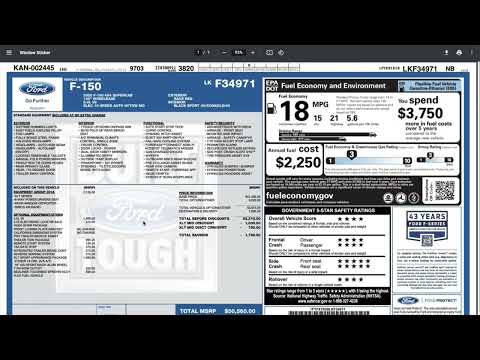
Pull and identify vehicle stickers, from their VIN numbers, with iPacket® SalesHub!
iPacket® SalesHub detects VIN numbers on website pages you visit. From there, the extension will highlight the VIN, and create a green button for you to pull a vehicle sticker from. Simply, click this button to pull/download the sticker! If the VIN does not highlight: - You are not logged into the iPacket Dealer Portal system, in which case, you can select the extension and login. You MUST login via the extension, logging into the web or mobile version of iPacket Dealer Portal WILL NOT carry over to the extension. - There was a problem on our end scanning the webpage you are on, however, we WILL still work if you highlight the VIN text, right-click, and select the iPacket® SalesHub context menu option. We also provide a full coverage list, if you are curious what vehicles we support. This is located in the extension modal, after you login. To use the iPacket® SalesHub extension you MUST have a valid iPacket Dealer Portal account under a dealership that has activated sticker pulling. If you do not, this extension WILL NOT work. To request an iPacket Dealer Portal account please visit: https://www.ipacket.us/dealer-center/request-account. To request that your store activate sticker pulling through iPacket, please talk with your iPacket representative to turn this feature on. Thank you. Example website that includes a working VIN: - https://www.ipacket.us/vehicle/55SWF4KB4JU277668 Example videos: - https://www.youtube.com/watch?v=0oo9KjDdxxE - https://www.youtube.com/watch?v=Kxq4xixVqNg - https://www.youtube.com/watch?v=vPbI1DfA0e4 --- iPacket was born in a car dealership. We saw the angst every car buyer experienced. And we felt the burden every car dealer carried in trying to provide accurate information and backup. And we knew there was a better way. Today car buyers and dealers can simply turn to iPacket and find comprehensive detail, thorough documentation, and everything they need to know about their cars right at their fingertips. There is more to a vehicle than a history report and price, let us show you! Price is only an issue in the absence of value.™ For more information visit: https://www.ipacket.us/dealer-center
5 点満点で 4.710 件の評価
詳細
- バージョン3.0.120
- 更新:2026年3月30日
- 提供元Autoipacket, LLC
- サイズ3.34MiB
- 言語English (United States)
- デベロッパーAutoiPacket, LLC
48 Donley St Suite 102 Morgantown, WV 26501 USメール
chrome.ext.publishers@autoipacket.com - 非取引業者このデベロッパーは取引業者として申告していません。EU 加盟国の消費者とこのデベロッパーとの間に締結された契約には、消費者の権利が適用されません。
プライバシー

iPacket® SalesHub から、お客様のデータの収集と使用に関する以下の情報が開示されています。 詳しくは、デベロッパーの privacy policy をご確認ください。
iPacket® SalesHub は次を扱います。
このデベロッパーは、お客様のデータについて以下を宣言しています
- 承認されている以外の用途で第三者に販売しないこと
- アイテムの中心機能と関係のない目的で使用または転送しないこと
- 信用力を判断する目的または融資目的で使用または転送しないこと
サポート
質問や提案、問題がある場合は、パソコンのブラウザでこのページを開いてください