

IP Tracker
7 ratings
)
Overview
One-click fast IP address finder with IP Tracker for instant IP information lookup, location insights, and quick network checks.
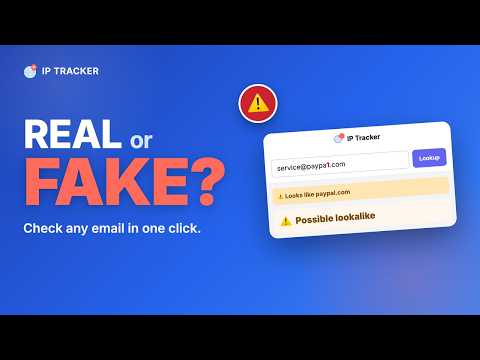
🛡️ It's 9pm. An email says your account is locked — "verify now or lose access." The logo looks right. The link looks close. Is it real, or is someone faking a brand you trust? IP Tracker gives you a fast second opinion before you click. Paste the sender's address and it tells you, in plain English, whether the domain is impersonating a real company. No account. No sign-in. No learning curve. Just an honest read on whether something is a fake. 🔍 What every check surfaces: ➤ Lookalike & typo-squat detection — names the trick out loud. It spots homoglyph swaps (like paypaI.com, where the "l" is really a capital i) and typo-squats (like paypall.com) against a list of over 100 real brands, and tells you which brand a domain is imitating. ➤ Google Safe Browsing — cross-references the same dangerous-site list behind Chrome's "Deceptive site ahead" warning. ➤ VirusTotal — surfaces detections from dozens of security vendors for the domain. ➤ Domain categorization — surfaces flags like phishing, newly-registered, malware, or social network from VirusTotal's data. ➤ Network type — data center, ISP, mobile, or business, so you know what kind of host you're dealing with. ➤ A plain-English verdict — ✅ Looks clean · ⚠️ Use caution · 🛑 Avoid — backed by community abuse reports, VPN / proxy / Tor detection, and a 0–100 risk score. All of it shown as a clear warning banner, not a wall of jargon. 🎯 Who it's for: 📧 Anyone who just got a message that feels off: • Paste a suspicious sender's email address — IP Tracker pulls out the domain automatically and checks whether it's faking a real brand • Get a plain warning when a link's domain is a lookalike of a company you know • Decide before you click, reply, or hand over a password 🛒 Anyone vetting a site or seller: • Check an unfamiliar shop, marketplace listing, or "too good to be true" deal before you pay • Look up a vendor's domain before sharing data or making a purchase • See whether an IP is a residential proxy, VPN, or Tor exit often used in account abuse 🖥️ Developers and engineers (it's serious under the hood): ▸ Full geolocation — country, city, ISP, ASN, and organization for any IP ▸ Complete WHOIS — registrar, creation, update, and expiration dates ▸ DNS records — A, MX, NS, and TXT, without leaving the tab ▸ One-click Censys deep-link for a full host report ▸ Investigate unfamiliar IPs from server logs, alerts, or dashboards ▸ Confirm ASN ownership when debugging routing or CDN issues ▸ Check WHOIS or resolve DNS when planning a migration or a domain acquisition 🔎 Analysts and due-diligence work: • Verify a partner or vendor's infrastructure before signing a contract • Compile basic domain intelligence for a compliance review • Cross-check an IP or domain from a SIEM event or threat-intel alert • Confirm a customer-reported IP matches their claimed location 🌐 How it works: 1️⃣ Pin the IP Tracker icon to your Chrome toolbar 2️⃣ Paste a suspicious email address into the search box — the sender's domain is extracted and checked for you 3️⃣ Or click the icon on any site to check the page you're on 4️⃣ Or right-click selected text on any page and choose "Lookup IP/Domain" from the menu 5️⃣ Read the warning banner and the supporting details, side by side 🛡️ The read at a glance: When a domain is impersonating a brand, IP Tracker shows a clear warning banner naming the brand it mimics and the trick it's using. When nothing is flagged, you get a ✅ result — with the reasons shown below it, so you can decide for yourself. A clean check means "nothing found yet," not a guarantee of safety — it's a second opinion, not a promise. 🔒 Privacy by design: ➤ No account, no sign-in, no profile ➤ No browsing history collected — only the specific address or domain you actively look up is ever sent to our backend ➤ All API keys stay on our backend server, never in your browser ➤ Free tier of 25 checks per day, enforced by a random local ID with no personal information attached ➤ No cookies, no tracking pixels, no cross-site identifiers 🤝 Powered by trusted intelligence sources: ✅ Google Safe Browsing — the dangerous-site list behind Chrome's own warnings ✅ VirusTotal — multi-vendor domain detections, WHOIS, DNS, and reputation ✅ AbuseIPDB — community-reported abuse signals ✅ proxycheck.io — VPN, proxy, and Tor exit detection ✅ ipinfo.io — IP geolocation, ISP, and ASN data ✅ Censys — one-click deep-link to a full host report ❓ FAQ 1️⃣ Is IP Tracker free? ✔️ Yes — 25 checks per day, no payment, no credit card, no account required. 2️⃣ Do I need to sign up? ✔️ No. Install it and start checking suspicious emails and domains right away. 3️⃣ What data is collected? ✔️ Only the specific address or domain you actively look up. Your browsing history is never collected or stored. 4️⃣ How accurate is it — does a clean result mean I'm safe? ✔️ IP Tracker flags known lookalikes, cross-references Google Safe Browsing, and surfaces VirusTotal detections — but no tool catches everything. A clean check means "nothing found yet," not "guaranteed safe." Treat it as a second opinion to help you decide, and stay cautious with anything that still feels off. 5️⃣ What happens at the daily limit? ✔️ A clear "Daily limit reached" message appears and the counter resets at midnight UTC, keeping the free tier free for everyone. 🎉 Free. Private. Works everywhere. Add IP Tracker to Chrome and get a fast, honest read on whether that email, link, or site is faking a brand you trust — before you click.
5 out of 57 ratings
Details
- Version1.9
- UpdatedOctober 5, 2026
- Offered bykiviasworld
- Size246KiB
- Languages52 languages
- Developer
Email
kiviasworld@gmail.com - Non-traderThis developer has not identified itself as a trader. For consumers in the European Union, please note that consumer rights do not apply to contracts between you and this developer.
Privacy

This developer declares that your data is
- Not being sold to third parties, outside of the approved use cases
- Not being used or transferred for purposes that are unrelated to the item's core functionality
- Not being used or transferred to determine creditworthiness or for lending purposes