


Overview
Translate selected text without leaving the page.
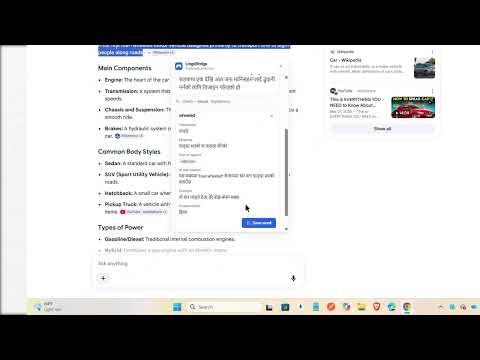
Translate any selected text without leaving the page — and understand it, not just see a literal swap. HOW IT WORKS Select text on any page. A small magic icon appears beside it. Click it, and LingoBridge detects the source language and translates into your preferred target language right where you're reading — no new tab, no copy-paste round trip. WHAT MAKES IT DIFFERENT • Built for real understanding, not word-for-word substitution — ambiguous phrases get a short explanation instead of a guess presented as fact. • Handles romanized Nepali (Nepali typed in Latin letters), a common informal writing style most translators ignore. • Translation always starts with something you clicked — never a silent scan of the page you're on. • Every result tells you which provider produced it, so nothing is a black box. YOUR DATA, ON YOUR TERMS • Works without an account. Sign in only if you want to sync saved phrases to the companion dashboard. • The dashboard stores phrases you deliberately save — never an automatic history of everything you translate. • Password fields, cookies, and full page content are never read. Only the text you select. • Site access is opt-in per site; revoking it removes the translation icon immediately. WHO IT'S FOR Students reading foreign-language material, travelers and migrants navigating unfamiliar text, multilingual teams reading quick messages, and anyone tired of the copy → new tab → paste → translate → switch back loop.
0 out of 5No ratings
Details
- Version0.1.2
- UpdatedSeptember 25, 2026
- Size509KiB
- LanguagesEnglish
- DeveloperWebsite
Email
rojanacharya404@gmail.com - Non-traderThis developer has not identified itself as a trader. For consumers in the European Union, please note that consumer rights do not apply to contracts between you and this developer.
Privacy

LingoBridge has disclosed the following information regarding the collection and usage of your data. More detailed information can be found in the developer's privacy policy.
LingoBridge handles the following:
This developer declares that your data is
- Not being sold to third parties, outside of the approved use cases
- Not being used or transferred for purposes that are unrelated to the item's core functionality
- Not being used or transferred to determine creditworthiness or for lending purposes