

DevTools Theme: Atom Dark with Green Cursor

Przegląd
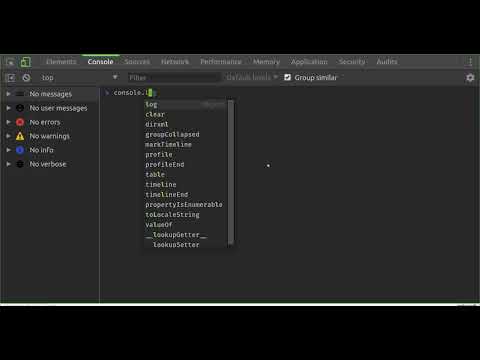
A highly customized dark theme for Devtools with a blinking green cursor in the console.
This is an experimental theme for the Chrome Developer Tools that utilizes DevTools Experiments flag within Chrome. // INSTALL INSTRUCTIONS 1. Install this theme extension. 2. Open chrome://flags/#enable-devtools-experiments 3. Locate and enable "Enable Developer Tools experiments". 4. Select "Relaunch Now" at the bottom of the page (WARNING: this will restart Chrome). 5. Open DevTools > Settings 6. Select Experiments tab, and check 'Allow custom UI themes'. 7. Select Preferences Tab, and selected Theme: Dark. 7. Reload DevTools. // FAQ > Does it really have a blinking cursor, like an old school terminal? Indeed it does. See https://www.youtube.com/watch?v=A7dXmUAPtPA for example. > What is theme based on? The excellent work of Maurice Cruz' zero-base-themes (https://github.com/mauricecruz/zero-base-themes) and Marvin R' vscode-theme-dark-atom-dark-green-cursor (https://github.com/therealmarv/vscode-theme-dark-atom-dark-green-cursor). > Where can I contribute? All the code is licensed MIT on Github: https://github.com/justinribeiro/chrome-devtools-theme-atom-dark-green-cursor/
4,3 na 53 oceny
Szczegóły
- Wersja1.0.0
- Zaktualizowano25 maja 2018
- Rozmiar33.4KiB
- JęzykiEnglish (United States)
- DeweloperWitryna
E-mail
justin.david.ribeiro@gmail.com - Osoba niebędąca przedsiębiorcąTen deweloper nie określił, że jest przedsiębiorcą. Pamiętaj, że prawa konsumentów nie obowiązują w przypadku umów zawartych między tym deweloperem a konsumentami z Unii Europejskiej.
Prywatność

Pomoc
Jeśli masz pytania, sugestie lub problemy, wejdź na stronę pomocy dla deweloperów