


Overview
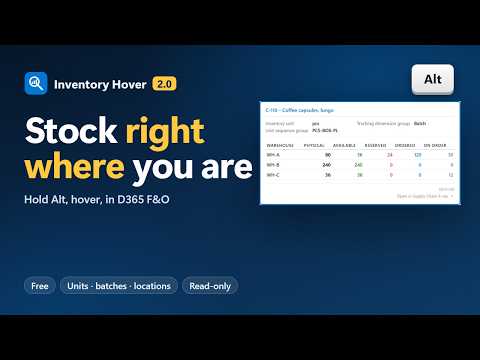
Hold Alt in Dynamics 365 F&O: stock per warehouse, product, batch and location details, and quantities in other units. Read-only.
Hold Alt and hover over an item number anywhere in Microsoft Dynamics 365 Finance & Operations. A tooltip shows the stock per warehouse and the product details you care about, without leaving the page you are working on. The same works on a batch number, a warehouse location, and any quantity or unit, which it converts to every unit of the item's unit sequence group. WHAT YOU SEE - Stock per warehouse: Physical, Available, Reserved, Ordered and On order. You choose which columns show and in what order. - Product details: any fields of the released product, including your own extension fields. New installs start with 13 standard fields. - Config, Color, Size, Style and Version columns, only when the item uses them. - Stock from all legal entities at once, if you switch on cross-company mode. - Catch weight items too: their stock is read from the catch weight on-hand entity when the standard one has no row. - Batch glance: Alt+hover over a batch number on a line with the item shows its expiration, best-before and manufacturing dates and disposition code, exactly as D365 stores them. - Location glance: Alt+hover over a warehouse location on a line with the warehouse shows its zones, location profile, type, status and blocking causes. - Unit conversion: Alt+hover over a quantity, on the On-hand list, an order line, a production order or a formula line, shows it in every unit of the item's unit sequence group, using D365's own unit conversions: the exact value, and what D365 rounds it to. It works on sales order lines, formula and BOM lines, loads, the released products list and any other page with an item number field. READ-ONLY AND LOCAL - Every request is a read-only OData GET to the D365 environment in your current tab, with the session you are already signed in with. Your D365 security roles apply exactly as in the UI. - Nothing is sent to Scan It Labs or anyone else. No analytics, no telemetry, no remotely loaded code. - The popup lists every request with its exact URL and response. - Lookups run only while Alt is held, are cached for five minutes and are limited to 30 requests a minute, so a shared environment is never flooded. - Every release is built reproducibly; IT departments can ask for the checksums of a version to confirm that the installed copy is exactly that release. FREE Inventory Hover is free, with no paid features. Version 2.0.0 adds one optional link under the tooltip, "Open in Supply Chain X-ray", to a paid extension by the same publisher that shows why an order is stuck. It does nothing until you click it, and the × next to it hides it for good. WHAT'S NEW IN 2.0.0 - New name: Inventory Hover (formerly D365FO Inventory Hover). - Stock for catch weight items. - Batch glance on batch numbers and location glance on warehouse locations. - Unit conversion of quantities and units. - The optional Supply Chain X-ray link. - Fixes for an expired D365 session, a scrolled page and the shared rate limit. FOUND A BUG? If something doesn't work as described, or a field you hover shows no tooltip, email support@pwscanit.com. Mention the extension version, the D365 form and field, and what you expected to see. Please don't send real business data; a description or screenshot with made-up values is enough. Privacy policy: https://pwscanit.com/legal/privacy/#inventory-hover Inventory Hover is free, proprietary software by Scan It Labs (PW Scan IT BV). It is not made, endorsed or supported by Microsoft. Microsoft and Dynamics 365 are trademarks of the Microsoft group of companies.
0 out of 5No ratings
Details
- Version2.0.0
- UpdatedOctober 19, 2026
- Size76.32KiB
- LanguagesEnglish
- DeveloperPw Scan ItWebsite
Panterstraat 1 Roeselare 8800 BEEmail
support@pwscanit.comPhone
+32 479 33 73 62 - TraderThis developer has identified itself as a trader per the definition from the European Union and committed to only offer products or services that comply with EU laws.
- D-U-N-S372954252
Privacy

This developer declares that your data is
- Not being sold to third parties, outside of the approved use cases
- Not being used or transferred for purposes that are unrelated to the item's core functionality
- Not being used or transferred to determine creditworthiness or for lending purposes
Support
For help with questions, suggestions, or problems, please open this page on your desktop browser