

Interview Copilot — AI Assistant

Overview
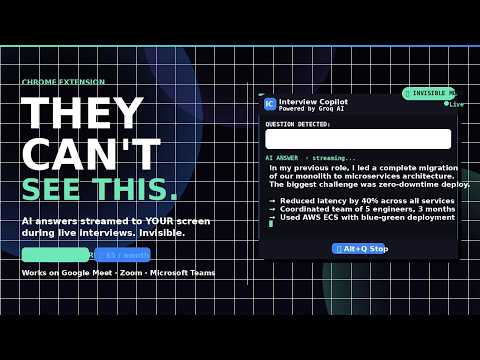
Real-time AI answers during interviews. Streamed instantly. Your secret weapon for landing the job.
Get real-time AI-powered answers during your job interviews — streamed in seconds, visible only to you. Interview Copilot listens to the interviewer's question and delivers a structured, intelligent answer directly on your screen before you even finish thinking. The overlay runs in a Document Picture-in-Picture window — completely invisible when you share your tab or browser window on Google Meet, Zoom, or Microsoft Teams. ────────────────────────────── 🛡 INVISIBLE TO SCREEN SHARE ────────────────────────────── The AI overlay uses Chrome's Document Picture-in-Picture API — a separate floating window that is excluded from tab and window screen capture. When you share your tab or window (the default in every interview platform), your interviewer sees nothing. ✅ Share a tab → overlay invisible ✅ Share a window → overlay invisible ────────────────────────────── ⚡ HOW IT WORKS ────────────────────────────── 1. Click the extension icon and select your interview tab 2. The AI overlay appears as a floating PiP window — only visible to you 3. Press Alt+Q when the interviewer asks a question 4. Press Alt+Q again to stop — your answer streams in within seconds 5. Press Alt+W to instantly hide or show the overlay at any time ────────────────────────────── 🤖 FEATURES ────────────────────────────── - Real-time streaming answers — no waiting, no copy-paste - 4 AI models: Llama 3.1 8B (fastest), Llama 3.3 70B, Mixtral 8x7B, Gemma 2 9B - Voice input (Alt+Q) or type your question manually - Add your personal context (role, experience, tech stack) for tailored answers - Shorter button — instantly compress long answers into 3 bullet points - Follow-up question predictions — prepare before the interviewer follows up - Session history — revisit every Q&A from the current session - Opacity slider — adjust visibility on your screen - Drag and resize the overlay window however you like ────────────────────────────── 💳 PRICING ────────────────────────────── - 5 free questions — no account, no credit card required - Pro: $5/month — 50 questions per day, all AI models, full session history - License key delivered instantly by email after purchase ────────────────────────────── ✅ WORKS WITH ────────────────────────────── Google Meet · Zoom (browser) · Microsoft Teams (browser) · Any browser-based interview platform ────────────────────────────── ⚙ PERMISSIONS USED ────────────────────────────── - Microphone — to listen to interview questions (only when you press Alt+Q) - Active tab — to inject the overlay on your chosen interview tab - Storage — to save your license key, model preference, and context locally No interview audio is stored or transmitted. Your microphone is only active when you explicitly start listening.
0 out of 5No ratings
Details
- Version9.0.0
- UpdatedMarch 31, 2026
- FeaturesOffers in-app purchases
- Offered bybalajimule08918
- Size32.65KiB
- LanguagesEnglish
- DeveloperBalaji Mule
HOME NO 2530 NIRA ROAD NR DATTA MANDIR DATTANAGAR JUNI JEJURI JEJURI RURAL PUNE, Maharashtra 412303 INEmail
balajimule08918@gmail.comPhone
+91 87933 65792 - TraderThis developer has identified itself as a trader per the definition from the European Union and committed to only offer products or services that comply with EU laws.
Privacy

Interview Copilot — AI Assistant has disclosed the following information regarding the collection and usage of your data. More detailed information can be found in the developer's privacy policy.
Interview Copilot — AI Assistant handles the following:
This developer declares that your data is
- Not being sold to third parties, outside of the approved use cases
- Not being used or transferred for purposes that are unrelated to the item's core functionality
- Not being used or transferred to determine creditworthiness or for lending purposes
Support
For help with questions, suggestions, or problems, please open this page on your desktop browser