

Interpreter - Live Captions & Translation for Interpreters

Overview
Live captions and translation in Chrome's side panel, right beside your call. Made for phone and video interpreters.
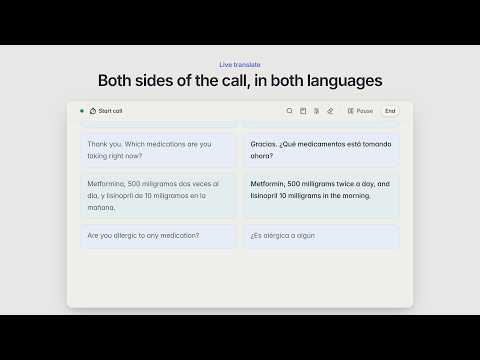
Interpreter puts every word on your screen as it's spoken. Both sides of the conversation, in real time. Works with any browser tab that has audio, including Zoom, Teams, Meet and any website. Also captures system audio from desktop apps. Open the side panel and go. How it works: 1. Open your call in a browser tab or desktop app 2. Click the Interpreter icon to open the side panel 3. Pick your languages and hit Start 4. Audio is transcribed and displayed as text in real time 5. Click any line to translate it, or switch to live mode for automatic two-way translation - Real-time transcription with automatic speaker labels - 60+ languages with auto-detection - Click any line to translate, or turn on live two-way mode - Quick term lookup with Ctrl+K - Custom glossary for your own terms - 10 domain modes: medical, legal, banking, insurance, government, and more - Focus Shield keeps you "online" on agency portals while using the side panel - Floating notes, keyboard shortcuts, dark mode - Works with any page that plays sound 1 hour free, no credit card. After that, pay as you go. No subscription, no monthly fee, your funds never expire. HIPAA compliant and SOC 2 Type II certified. When your call ends, your data is gone.
4.7 out of 585 ratings
Details
- Version0.5.47
- UpdatedOctober 17, 2026
- FeaturesOffers in-app purchases
- Size7.94MiB
- Languages55 languages
- DeveloperMirkamol ShonazarovWebsite
Bohaterów Monte Cassino 1 Katowice 40-231 PLEmail
mirkamol@useinterpreter.com - Non-traderThis developer has not identified itself as a trader. For consumers in the European Union, please note that consumer rights do not apply to contracts between you and this developer.
Privacy

Interpreter - Live Captions & Translation for Interpreters has disclosed the following information regarding the collection and usage of your data. More detailed information can be found in the developer's privacy policy.
Interpreter - Live Captions & Translation for Interpreters handles the following:
This developer declares that your data is
- Not being sold to third parties, outside of the approved use cases
- Not being used or transferred for purposes that are unrelated to the item's core functionality
- Not being used or transferred to determine creditworthiness or for lending purposes
Support
For help with questions, suggestions, or problems, visit the developer's support site