


Overview
Hear any tab in your language, spoken and subtitled in real time.
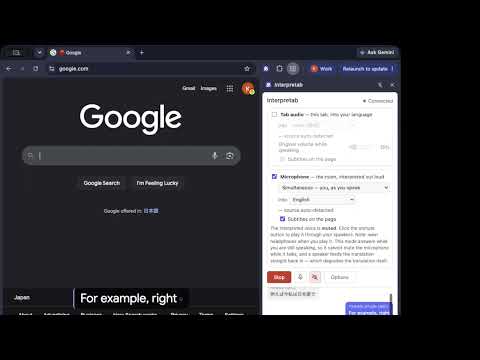
Interpretab translates what your browser tab is playing, and what you say into the microphone, through the Gemini Live API in real time. The translation is spoken out loud and written on the page as subtitles at the same time. • Watch videos, streams, podcasts and online meetings in any of 78 languages, listening and reading at once. • Present or stream with your own voice subtitled in your audience's language, on the page you are sharing. • On Google Meet, the people in the call hear your voice dubbed into their language. • Use the microphone on your PC or Mac as a real-time interpreter for the person in front of you. Your browser connects straight to the Gemini API with a key you supply yourself. There is no server in between, and a free-plan key costs nothing to run. Guide: https://kazunori279.github.io/interpretab/ ▍ SPOKEN ALOUD, AND SUBTITLED ON THE PAGE The subtitles sit bottom-centre, three lines rolling, and work in fullscreen too. Their size is a slider in Options, 16 to 64 px. ▍ TAB AUDIO AND MICROPHONE, AT THE SAME TIME The browser tab's audio is translated into your language, and your microphone into theirs. Speak English, be heard in Japanese by the people in the room with you; hear their Japanese back in English. Microphone translation has two modes: Simultaneous, which starts translating while you are still speaking, and Two-way conversation, which translates a conversation between two languages turn by turn. ▍ IN ONLINE MEETINGS In an online meeting, the other side's audio is translated, played back to you and subtitled (for meeting tools that run in a browser tab). On Google Meet, picking "Interpretab (translated)" in Meet's own audio settings is all it takes to send your translated voice to the other side. Any other service needs a virtual audio device (see THINGS TO KNOW). ▍ THE ORIGINAL DUCKS, IT DOESN'T DISAPPEAR Interpretab plays the tab's own audio back to you and lowers it while the translated voice is speaking, then brings it straight back. It ducks on speech rather than holding the level down throughout. The level is a slider. ▍ A GLOSSARY THAT GETS YOUR TERMS RIGHT In Two-way conversation mode you can register product names, people's names and jargon, with how each is pronounced and how it should be spelled. ▍ NO SERVER IN BETWEEN. YOUR BROWSER TALKS TO THE GEMINI LIVE API DIRECTLY. Interpretab connects to Google's Gemini Live API with an API key you obtain yourself. There is no external server and no middleman service in between. Your audio and subtitles reach nobody but Google. ▍ LANGUAGES Tab audio translation: the source language is detected for you. A tab plays whoever it plays, and changing a setting every time a video cuts to a second speaker would be a chore. 78 target languages. Microphone translation: in Simultaneous mode the source is detected too, and you choose from the same 78 targets. In Two-way conversation mode you name both languages of the pair, from 97. ▍ HOW TO USE IT 1. Paste your Gemini API key into Options, and say whether it is on Google's Free or Paid plan. 2. Open the page you want translated and click the Interpretab toolbar icon ON THAT TAB. The click is what grants access to it. 3. Choose your languages in the side panel and press Start. For details, see the guide: https://kazunori279.github.io/interpretab/ ▍ THINGS TO KNOW • It is machine translation. It mishears, guesses at names, and sometimes says something the speaker did not. Don't use it where a mistranslation would cost you. • Outside Google Meet, sending your translated microphone audio to a meeting app needs a virtual audio device (BlackHole, VB-Cable). • The glossary applies to the microphone's Two-way conversation mode only. Everything else uses Google's simultaneous-translation model, which accepts no glossary. ▍ COST The Gemini Live API behind the translation has a free plan to try it on, and a paid plan for regular use. On the paid plan, as prices stood in August 2026, tab audio translation costs about $2.20 per hour, and Two-way conversation mode about $1.40 per hour. For the difference between the free and paid plans, see the guide: https://kazunori279.github.io/interpretab/ ▍ OPEN SOURCE Source, privacy policy and issue tracker: https://github.com/kazunori279/interpretab Apache 2.0. Requires Chrome 116 or newer.
5 out of 52 ratings
Details
- Version1.0.4
- UpdatedAugust 25, 2026
- Size223KiB
- Languages10 languages
- Developer
- Non-traderThis developer has not identified itself as a trader. For consumers in the European Union, please note that consumer rights do not apply to contracts between you and this developer.
Privacy

Interpretab has disclosed the following information regarding the collection and usage of your data. More detailed information can be found in the developer's privacy policy.
Interpretab handles the following:
This developer declares that your data is
- Not being sold to third parties, outside of the approved use cases
- Not being used or transferred for purposes that are unrelated to the item's core functionality
- Not being used or transferred to determine creditworthiness or for lending purposes
Support
For help with questions, suggestions, or problems, visit the developer's support site