

Intercepto
2 ratings
)
Overview
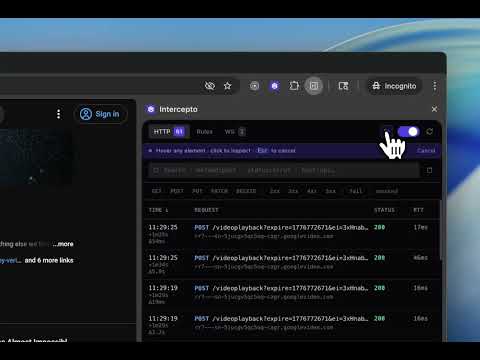
Inspect and edit the APIs behind any UI. Intercept, mock, and replay HTTP and WebSocket traffic in Chrome—no setup required.
Ever opened Chrome DevTools, stared at the Network tab, and still struggled to understand what’s powering your UI? You click around, hunt for the right request, scroll through JSON, refresh again… and repeat. What you want is simple: See the API behind the UI. Change it. Move on. ✦ What is Intercepto? Intercepto is a developer tool that lets you inspect, edit, and mock APIs directly from your browser—no proxy, no setup, no code changes. It captures every request made by the page (fetch, XHR, GraphQL, WebSocket) and gives you full control over how your app behaves. ⭐ Key Features ⭐ 🔍 UI → API inspection Hover over any element to see which API (or WebSocket message) likely powered it ✏️ Edit & mock responses instantly Modify response body, status, or headers and persist overrides across refreshes 🌐 Full network interception Capture fetch, XHR, GraphQL, and WebSocket traffic in one place 🔁 Persistent overrides Save mocked responses and have them applied automatically on future requests 📡 WebSocket & Socket.IO viewer Understand real-time events with a structured, readable flow (not raw logs) 🔎 Powerful request explorer Search, filter, and inspect requests with clean UI and cURL export support 📋 Clean debug context (copy-ready) Select relevant logs, errors, and requests and copy a clean, structured debugging context—ready to share or use anywhere ⚡ Works on any website Use it on local, staging, or production apps—no source code changes required ✦ Why Intercepto? Because debugging APIs shouldn’t mean digging through noisy logs or setting up proxies. Intercepto lets you understand and control your app’s data directly from the UI. ✦ Perfect for • Frontend development without backend dependencies • QA testing with edge cases and mocked responses • Debugging third-party or production applications • Understanding how APIs drive UI behavior ✦ Built for developers Intercepto is designed for engineers who want speed, clarity, and control—without changing how their app is built.
3 out of 52 ratings
Details
- Version0.1.2
- UpdatedApril 29, 2026
- Offered byRohan
- Size12.27MiB
- LanguagesEnglish
- Developer
Email
grohan95@gmail.com - Non-traderThis developer has not identified itself as a trader. For consumers in the European Union, please note that consumer rights do not apply to contracts between you and this developer.
Privacy

This developer declares that your data is
- Not being sold to third parties, outside of the approved use cases
- Not being used or transferred for purposes that are unrelated to the item's core functionality
- Not being used or transferred to determine creditworthiness or for lending purposes