

Instant Mobile Preview - Side Panel View
2 valoraciones
)
Descripción general
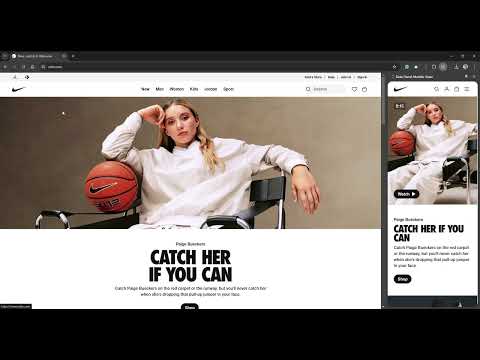
View mobile versions of websites side-by-side in Chrome's side panel.
Side Panel Mobile View is a simple Chrome extension designed to streamline mobile testing and boost web development productivity. With this tool, you can instantly view a side-by-side mobile version of any website directly within your browser. By leveraging built-in device emulation, the extension provides an accurate website mobile view that helps you test mobile responsiveness, analyze design elements, and perform competitive research with ease. Note: Does not work for some websites due to Content Security Policies (CSP) including X/Twitter and Facebook. 🚀 Key Features & Benefits Instant Mobile Testing: Quickly switch to a mobile preview without leaving your current webpage. The extension seamlessly opens a side panel, allowing you to view and test the mobile version of any website side-by-side with its desktop counterpart. This real-time mobile responsiveness testing saves time and streamlines your workflow. Enhanced Mobile Responsiveness: Use built-in device emulation to render an accurate mobile view. Ensure your website looks great on smartphones by checking its layout, functionality, and performance as you make design updates. Ideal for developers, UX/UI designers, and product managers aiming to perfect their mobile experience. User-Friendly Interface: The extension offers a minimalistic and intuitive design. Activate the mobile view easily via the Chrome toolbar icon or by right-clicking on a webpage and selecting “See Mobile View.” With independent scrolling in the mobile preview, you can inspect every detail without interference. Optimized for Performance: Engineered to be lightweight and fast, Side Panel Mobile View ensures that your browser remains responsive. The mobile view loads within seconds, providing an efficient tool for on-the-fly mobile testing and rapid iterations. ✅ Why Install Side Panel Mobile View? Streamline Your Workflow: Eliminate the need to switch between tabs or external devices for mobile testing. With a single click, get an immediate mobile preview right inside your Chrome browser. Improve Mobile Responsiveness: Ensure your websites meet high standards of mobile responsiveness by testing designs in real time. Detect and resolve issues early, leading to a smoother user experience across all devices. Boost Productivity: Designed with efficiency in mind, this extension minimizes load times and resource usage while providing comprehensive mobile view capabilities. Spend less time configuring setups and more time perfecting your designs. Optimized for Web Professionals: Whether you're a developer, designer, or product manager, Side Panel Mobile View delivers the insights you need to create engaging, responsive web experiences. It’s the perfect tool for competitive research, responsive design testing, and on-the-go mobile previewing. ✨ Perfect for: Web Developers UX/UI Designers Product Managers Quality Assurance Teams Keywords: mobile responsiveness, mobile testing, website mobile view, responsive design, device emulation, mobile preview, web development, Chrome extension, mobile web, UX/UI design, competitive research, performance testing Get Started Today: Transform the way you test and optimize mobile web experiences. Install Side Panel Mobile View from the Chrome Web Store and leave us feedback!
4 de 52 valoraciones
Detalles
- Versión1.0.1
- Actualizado23 de abril de 2025
- Ofrecido porintentionaldetour
- Tamaño18.45KiB
- IdiomasEnglish (United States)
- Desarrollador
Correo electrónico
intentionaldetour@gmail.com - No operadorEste desarrollador no se ha identificado como operador. Los consumidores residentes en la Unión Europea deben tener en cuenta que los derechos de los consumidores no son aplicables a los contratos que suscriban con este desarrollador.
Privacidad

Este desarrollador declara que tus datos:
- No se venden a terceros, excepto en los casos de uso aprobados
- No se usan ni se transfieren para fines no relacionados con la función principal del elemento.
- No se usan ni se transfieren para determinar la situación crediticia ni para ofrecer préstamos.