

Instagram Video Controls
13 ratings
)
Overview
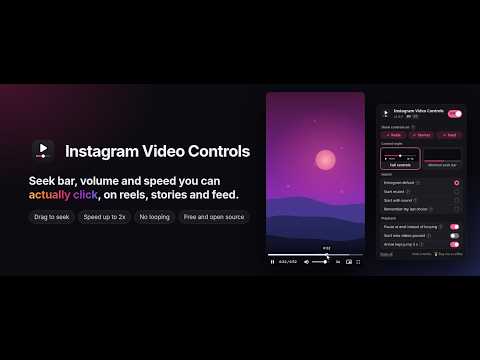
Video controls you can actually click on Instagram for desktop: seek bar, audio settings and no looping on reels, stories and feed.
Instagram on the desktop shows videos without real controls. Instagram Video Controls adds a control bar that you can actually click, on reels, stories and feed videos. What you get - Seek bar you can click or drag, with a time preview and the buffered range - Play and pause, current time and length - Mute button and volume slider - Playback speed: 0.5x, 1x, 1.25x, 1.5x and 2x - Picture in picture and fullscreen - Pause at the end instead of looping forever - Left and right arrow keys jump 5 seconds (reels and feed) Pick what you need - One ON/OFF switch to turn everything off without uninstalling - Turn it on for reels, stories and feed, each on its own - Full controls, or a minimal seek bar along the bottom edge - Audio: keep Instagram's default, start muted, start with sound, or remember your last mute and volume - Optionally start new videos paused - A ? next to each setting explains what it does, and a how-it-works page walks you through the bar Settings sync across your own signed-in Chrome profile. Why 2.0 fixes the controls you couldn't click Version 1.x turned on the browser's native video controls. On instagram.com, each video sits inside a stack of page layers, and one of Instagram's layers covers the video. The controls were visible, but clicks landed on that layer instead: a click on the timeline could restart the video instead of seeking. Version 2.0 draws its own control bar in a separate layer on top of the whole page, so nothing on Instagram can cover it. Every click reaches the bar. Privacy No data collected. No analytics, no tracking, no network requests. Your settings are stored by Chrome's own storage and never leave your browser except through Chrome sync of your own profile. English and Brazilian Portuguese, with an EN | PT switch. Independent project, not affiliated with, endorsed by or sponsored by Instagram or Meta. Instagram is a trademark of Instagram, LLC. Free and open source (GPL-3.0): https://github.com/kbrianps/instagram-video-controls
2.8 out of 513 ratings
Details
- Version2.0.0
- UpdatedNovember 13, 2026
- Offered bykbrianps
- Size36.6KiB
- Languages2 languages
- Developer
Email
contact@kbrianps.com - Non-traderThis developer has not identified itself as a trader. For consumers in the European Union, please note that consumer rights do not apply to contracts between you and this developer.
Privacy

This developer declares that your data is
- Not being sold to third parties, outside of the approved use cases
- Not being used or transferred for purposes that are unrelated to the item's core functionality
- Not being used or transferred to determine creditworthiness or for lending purposes
Support
For help with questions, suggestions, or problems, visit the developer's support site