

Instagram Seek Bar
5 ratings
)
Overview
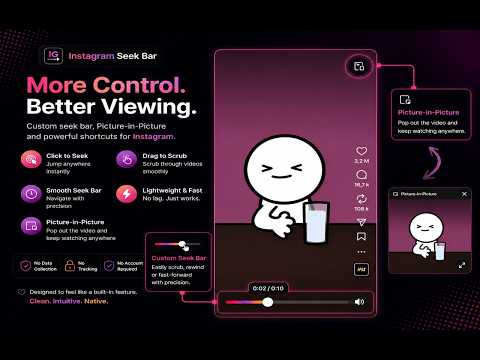
Adds a custom seek bar, Picture-in-Picture, and playback controls to Instagram Reels and videos.
Take control of Instagram videos on desktop. Reel Controls adds a smooth seek bar and Picture-in-Picture support to Instagram, making it easier to navigate through Reels and videos without changing the way Instagram looks or works. With the seek bar, you can jump to any moment instantly, drag to scrub through videos, and always see the current playback time alongside the total video duration. Picture-in-Picture lets you keep watching a video while working in other tabs or applications. Features: Smooth seek bar for Instagram videos and Reels Click anywhere on the progress bar to seek instantly Drag to scrub through videos Current time and total duration display Picture-in-Picture support Lightweight and fast Blends naturally with Instagram's interface Works directly on instagram.com Reel Controls is designed to feel like a feature Instagram should already have. No account required. No tracking. No analytics. No data collection.
5 out of 55 ratings
Details
- Version1.1.0
- UpdatedJuly 26, 2026
- Offered byyoussefGh
- Size288KiB
- LanguagesEnglish
- Developer
Email
youssef20contact@gmail.com - Non-traderThis developer has not identified itself as a trader. For consumers in the European Union, please note that consumer rights do not apply to contracts between you and this developer.
Privacy

This developer declares that your data is
- Not being sold to third parties, outside of the approved use cases
- Not being used or transferred for purposes that are unrelated to the item's core functionality
- Not being used or transferred to determine creditworthiness or for lending purposes
Support
For help with questions, suggestions, or problems, visit the developer's support site