

Inspector Jake MCP

Overview
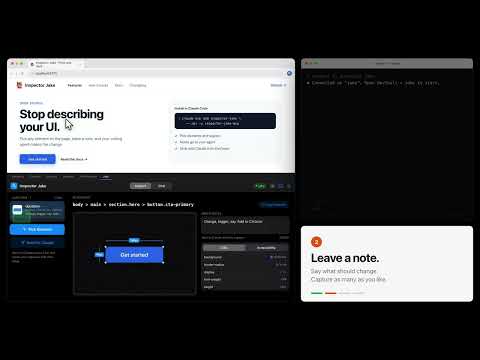
Inspect web pages via MCP - let AI agents see what you see in DevTools
Inspector Jake lets your AI coding agent see the page you're working on. Point at anything in Chrome, leave a note, and Claude Code makes the change. HOW IT WORKS 1. Point at it. Open DevTools, go to the Inspector Jake tab, click Pick Element and click anything on the page. Or drag to capture a region. 2. Leave a note. Say what should change. Capture as many elements as you like. 3. Send it to Claude. One click opens Chat and sends every capture, with its selector, styles and your note, to your Claude Code session. 4. Claude makes the change, then replies right in the panel. WHAT YOUR AGENT CAN DO • See your captures: screenshots, selectors, computed CSS and the accessibility tree • Read the page's console logs and network requests • Click, type, choose dropdown options, navigate and wait for elements • Run JavaScript and take screenshots SETUP Inspector Jake has two parts: this extension, and a small MCP server that runs on your computer. Add the server to Claude Code: claude mcp add inspector-jake -- npx -y inspector-jake-mcp Then open Chrome DevTools, go to the Inspector Jake tab, and connect to your session. The inspection tools also work with other MCP clients, such as Codex CLI and Claude Desktop. Chat with Claude Code works on macOS, Linux and Windows. PRIVACY Everything stays on your computer. The extension only talks to the MCP server on your own machine (127.0.0.1). No analytics, no tracking. Free and open source: https://github.com/inspectorjake/inspectorjake
0 out of 5No ratings
Details
- Version1.1.0
- UpdatedOctober 25, 2026
- Offered byjakechapa
- Size673KiB
- LanguagesEnglish
- Developer
Email
jayseeyoumee@gmail.com - Non-traderThis developer has not identified itself as a trader. For consumers in the European Union, please note that consumer rights do not apply to contracts between you and this developer.
Privacy

Inspector Jake MCP has disclosed the following information regarding the collection and usage of your data. More detailed information can be found in the developer's privacy policy.
Inspector Jake MCP handles the following:
This developer declares that your data is
- Not being sold to third parties, outside of the approved use cases
- Not being used or transferred for purposes that are unrelated to the item's core functionality
- Not being used or transferred to determine creditworthiness or for lending purposes
Support
For help with questions, suggestions, or problems, visit the developer's support site