Item logo image for InspectMode Pro: AI Prompt, Inspect, Color, Fonts

InspectMode Pro: AI Prompt, Inspect, Color, Fonts

inspectmode.xyz
5.0(

9 ratings

)
Item media 5 (screenshot) for InspectMode Pro: AI Prompt, Inspect, Color, Fonts
Item media 6 (screenshot) for InspectMode Pro: AI Prompt, Inspect, Color, Fonts
Item video thumbnail
Item media 2 (screenshot) for InspectMode Pro: AI Prompt, Inspect, Color, Fonts
Item media 3 (screenshot) for InspectMode Pro: AI Prompt, Inspect, Color, Fonts
Item media 4 (screenshot) for InspectMode Pro: AI Prompt, Inspect, Color, Fonts
Item media 5 (screenshot) for InspectMode Pro: AI Prompt, Inspect, Color, Fonts
Item media 6 (screenshot) for InspectMode Pro: AI Prompt, Inspect, Color, Fonts
Item video thumbnail
Item media 2 (screenshot) for InspectMode Pro: AI Prompt, Inspect, Color, Fonts
Item video thumbnail
Item media 2 (screenshot) for InspectMode Pro: AI Prompt, Inspect, Color, Fonts
Item media 3 (screenshot) for InspectMode Pro: AI Prompt, Inspect, Color, Fonts
Item media 4 (screenshot) for InspectMode Pro: AI Prompt, Inspect, Color, Fonts
Item media 5 (screenshot) for InspectMode Pro: AI Prompt, Inspect, Color, Fonts
Item media 6 (screenshot) for InspectMode Pro: AI Prompt, Inspect, Color, Fonts

Overview

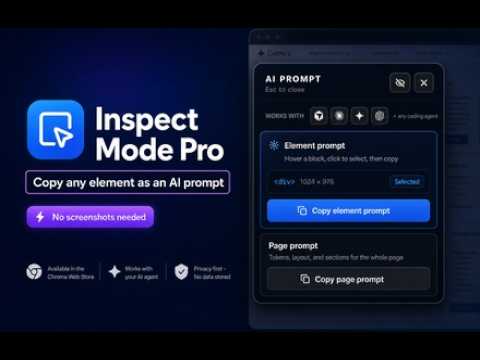
Click any element to copy an AI prompt for Cursor, Claude & Codex. Inspect CSS, pick colors, find fonts & grab assets.

Stop screenshotting designs into your coding agent. Supercharge your workflow with Inspect Mode Pro. Inspect Mode Pro is the professional-grade browser extension built for developers and designers working in the age of AI. Whether you're rebuilding a component, running a competitive audit, or extracting assets for a mock up, our toolkit turns anything you see on the web into something you can ship instantly. Designed to be lightweight and intuitive, it transforms your browser into a powerful design intelligence platform. ✨ New: AI Element Copy Prompt No screenshots. No guesswork. Point at any element and copy a ready-to-use, structured prompt for your favourite coding agent — Cursor, Claude, Gemini, Codex, or any AI you already use. Instead of pasting a blurry screenshot and hoping the agent figures it out, you hand it the real structure, styles, and layout behind the design. Grab a single element or a full-page prompt and paste it straight into your agent. This is the fastest way to go from "I like that design" to working code. 🚀 Key Features: AI Element Copy Prompt: Turn any element (or entire page) into an agent-ready prompt for Cursor, Claude, Gemini & Codex — no screenshots needed. Advanced Element Inspector: A clean, clutter-free view of CSS properties, spacing, and box-model data — free forever. One-Click Asset Downloader: Instantly extract images, SVGs, and web assets from any webpage. Precision Colour Picker: Identify and copy HEX, RGB, or HSL codes with pixel-perfect accuracy, plus a built-in eyedropper. Font Analysis: View font family, weight, size, and line-height instantly. Optimized for Speed: Fast and responsive, keeping your browser snappy even on heavy sites. 💎 Why Choose Inspect Mode Pro? Standard dev tools are built for debugging. Inspect Mode Pro is built for creation — especially AI-assisted creation. Screenshots lose the details that matter; we hand your coding agent the actual structure and styles instead. Less friction, fewer wrong guesses, faster from design to code. 🆓 Free Forever + Pro on Trial The Element Inspector is free for everyone, forever. Unlock the AI Copy Prompt, Asset Downloader, Colour Picker, and Font Analysis with a 3-day free trial (no credit card) — then keep them all with a one-time Lifetime purchase. No subscriptions, ever. 🔒 Privacy & Trust We respect your privacy. Inspect Mode Pro does not track your browsing history or collect personal data. All inspection happens locally in your browser. Get started with a 3-day free trial or grab Lifetime Access at inspectmode.xyz

Details

  • Version
    2.0.0
  • Updated
    July 22, 2026
  • Features
    Offers in-app purchases
  • Size
    125KiB
  • Languages
    English
  • Developer
    ARYAN CHAUHAN
    Yello Living, Pattandur Agrahara, Whitefield Bengaluru, Karnataka 560066 IN
    Website
    Email
    aryanxcreates@gmail.com
    Phone
    +91 78007 00083
  • Trader
    This developer has identified itself as a trader per the definition from the European Union and committed to only offer products or services that comply with EU laws.

Privacy

Manage extensions and learn how they're being used in your organization

InspectMode Pro: AI Prompt, Inspect, Color, Fonts has disclosed the following information regarding the collection and usage of your data. More detailed information can be found in the developer's privacy policy.

InspectMode Pro: AI Prompt, Inspect, Color, Fonts handles the following:

User activity
Website content

This developer declares that your data is

  • Not being sold to third parties, outside of the approved use cases
  • Not being used or transferred for purposes that are unrelated to the item's core functionality
  • Not being used or transferred to determine creditworthiness or for lending purposes

Support

For help with questions, suggestions, or problems, visit the developer's support site

Related

SubShelf — Smart YouTube Subscription Folders

5.0

Smart Subscription Category Folders & Feed Curator for YouTubeâ„¢

OrgaNice – Tab Manager with Tab Rules, Nested Folders & Snooze Tabs

5.0

Organize tabs with nested folders, collections & snooze. Set up Tab Rules to automate how OrgaNice handles your tabs.

Stashed - Bookmark Manager

0.0

Never lose anything you saved again. Save anything in one click, find it again in seconds.

Element Select - AI Agent Annotation Tool

5.0

Annotate web elements and generate structured feedback for AI coding agents

Pinta

5.0

Pinta — annotate your running app and hand the changes to a coding agent.

Screenshot Capture and Editor by Snapester

5.0

Capture screenshots instantly, edit with crop, backgrounds, GIFs, video effects and exports using Screenshot Editor by Snapester.

AI Screen Recorder - OneshotFX

5.0

Record your screen with AI auto-captions and voiceover, then edit with zoom, trim, crop, and click effects

PikSpec – Build with AI · CSS & Font Finder

5.0

Turn any website's design into a ready kit for Claude, Cursor and Codex. Inspect CSS, fonts and colors; export tokens and DESIGN.md.

SuperDev Pro

4.4

One extension that replaces all your browser tools — inspect, design, modify, capture, scrape, automate, and more in a sidebar.

DESIGN.md extractor by getdesignsystem.io

5.0

Extract design systems from any website. Get tokens for Claude, Cursor, and other AI coding agents.

ILoveSnapshots - Full Page Beautiful Screenshots

4.9

Capture beautiful full page screenshots of any website instantly. One click, aesthetic backgrounds, 4K quality and editing tools

Inspect All - Web Inspector, Fonts & SEO Tools

5.0

Inspect fonts, colors, assets, SEO and responsiveness of any website in one simple side panel.

SubShelf — Smart YouTube Subscription Folders

5.0

Smart Subscription Category Folders & Feed Curator for YouTubeâ„¢

OrgaNice – Tab Manager with Tab Rules, Nested Folders & Snooze Tabs

5.0

Organize tabs with nested folders, collections & snooze. Set up Tab Rules to automate how OrgaNice handles your tabs.

Stashed - Bookmark Manager

0.0

Never lose anything you saved again. Save anything in one click, find it again in seconds.

Element Select - AI Agent Annotation Tool

5.0

Annotate web elements and generate structured feedback for AI coding agents

Pinta

5.0

Pinta — annotate your running app and hand the changes to a coding agent.

Screenshot Capture and Editor by Snapester

5.0

Capture screenshots instantly, edit with crop, backgrounds, GIFs, video effects and exports using Screenshot Editor by Snapester.

AI Screen Recorder - OneshotFX

5.0

Record your screen with AI auto-captions and voiceover, then edit with zoom, trim, crop, and click effects

PikSpec – Build with AI · CSS & Font Finder

5.0

Turn any website's design into a ready kit for Claude, Cursor and Codex. Inspect CSS, fonts and colors; export tokens and DESIGN.md.

Google apps