

inspecta — visual QA and CSS editor

Overview
Inspect, compare and update CSS visually
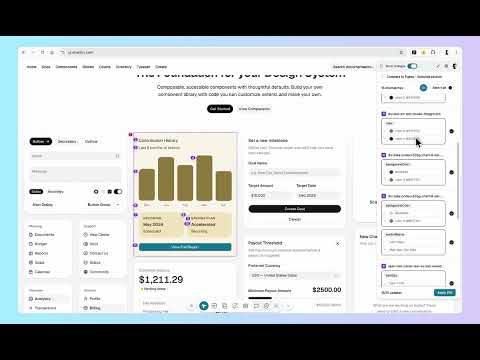
🛠 inspecta. Break the visual QA handoff loop. Inspect, compare, and fix any live page in the browser. Then close the loop two ways. WITH THE CODEBASE. Send the changes to Cursor or GitHub Copilot and let your agent execute them in the repo. WITHOUT THE CODEBASE. Audit and fix any live site with no repo, no setup, no build, then share the fixed version with whoever owns the code. Either way it ends at an applied fix, not a filed ticket. Built for designers, PMs, and front end teams doing visual QA, design handoff, and pixel perfect review. ━━━━━━━━━━━━━━━━━━━━ THE LOOP, IN ONE PANEL 1. COMPARE. Copy the element in the inspecta Figma plugin, paste it into Figma Compare, and get every diff found automatically. 2. FIX. Preview each fix live on the page before you commit to it, pick what to apply, and bulk apply the real Figma values. Overlay the pasted element as an image when you want to eyeball it. 3. CLOSE THE LOOP. Send the batch to Cursor or GitHub Copilot to execute in the repo, copy it as a prompt for any other IDE agent, or share a link with every fix already applied. One person, one pass, one handoff. ━━━━━━━━━━━━━━━━━━━━ WHAT YOU CAN DO 🔁 COMPARE WITH FIGMA Copy any frame or element in the inspecta Figma plugin, paste it into Figma Compare, and get every color, font, spacing, and layout diff found automatically. Preview each fix live on the page, select what matters, and bulk apply the real Figma values. Overlay the pasted element as an image when you want a visual check. Works on full screens or single elements, using actual design tokens and variables, not values guessed from a screenshot. 🧠 AUDIT THE WHOLE PAGE Run a full page visual QA audit from one panel, with or without a design file. Check the page against itself, a Figma baseline, or a DESIGN.md file. Surface mismatched colors, fonts, spacing, layout, and spelling, plus accessibility flags. Preview and apply fixes in one step. Copy a11y findings as a prompt for a coding agent. 📊 SEE EVERY STYLE ON THE PAGE Overview lists every color, type style, radius, spacing, border, effect, SVG, and image in use. Click a value to find every instance, edit once, and push the change across every matching element. Export Overview colors as Figma-ready JSON variables. Download page SVGs and images, or swap them for new ones. 🤖 DESCRIBE THE CHANGE, LET AI MAKE IT Say what you want in plain language and apply it to one element or the whole page. Works with OpenAI, Anthropic, and Gemini. Bring your own key. Keys stay encrypted on your device and inspecta never charges for AI usage. ✏️ OR EDIT STYLES, TEXT, AND ASSETS BY HAND Hover any element to view and edit its CSS directly. Size, spacing, color, typography, border, radius, shadow, and opacity. Rewrite text in place, swap images, and replace SVG assets. Edit hover states, pick colors with the eyedropper, and measure spacing with pixel accurate overlays. Apply to the selected element or All matching, and see every match outlined on the page. 🎛 TREAT ANY PAGE AS A PLAYGROUND Open any live site and try a version, then another. Test a layout direction, a color system, or a copy change on the real page, at real widths, with real content. Keep what works and send it on. Nothing you do touches the live site for anyone else. 📤 HAND OFF TO CURSOR OR COPILOT Send changes directly to Cursor or GitHub Copilot through the inspecta IDE extension and let the agent write the code. For other agents, copy the batch as a ready to paste prompt, or copy plain CSS. Batch a whole review into a single handoff and cut the back and forth. ☁️ SAVE, SYNC, AND SHARE Sign in with Google to auto save edits per page and keep them across sessions. Manage projects at app.inspecta.design, or share a public link so your developer opens the exact page with the exact changes waiting. ━━━━━━━━━━━━━━━━━━━━ USE INSPECTA FOR - Visual QA and design QA on staging or production - Design handoff from Figma to code - Pixel perfect review before release - Catching design drift after a sprint - Auditing any live page with no design file - Trying design directions on a real page before building them - Fixing copy and typos on a live page - Swapping images and SVG assets before handoff - Turning UI feedback into applied code changes ━━━━━━━━━━━━━━━━━━━━ WHAT MAKES INSPECTA DIFFERENT THE LOOP ENDS AT A FIX Most QA tools stop at a report. You find the bug, describe the bug, file the bug, and wait. inspecta hands your agent the actual change, or hands your developer a page with the change already made. THE VALUES ARE REAL Comparison runs on design tokens and variables pulled straight from the Figma file, not colors sampled off an image. What you apply is what is in the design. Free to start. Bring your own AI key. No seat math. ━━━━━━━━━━━━━━━━━━━━ WHAT'S NEW IN 0.5.4 - Bug fixes
5 out of 516 ratings
Details
- Version0.5.4
- UpdatedOctober 8, 2026
- Size1.08MiB
- LanguagesEnglish
- Developer
- Non-traderThis developer has not identified itself as a trader. For consumers in the European Union, please note that consumer rights do not apply to contracts between you and this developer.
Privacy

inspecta — visual QA and CSS editor has disclosed the following information regarding the collection and usage of your data. More detailed information can be found in the developer's privacy policy.
inspecta — visual QA and CSS editor handles the following:
This developer declares that your data is
- Not being sold to third parties, outside of the approved use cases
- Not being used or transferred for purposes that are unrelated to the item's core functionality
- Not being used or transferred to determine creditworthiness or for lending purposes
Support
For help with questions, suggestions, or problems, please open this page on your desktop browser