

InsFig – Collect refs, paste into Figma
3 ratings
)
Overview
Drag design refs from any site into a side panel, keep source and notes, then paste them all into Figma or save them as a folder.
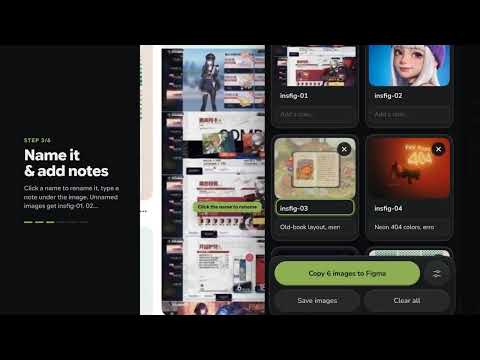
Browsing design galleries and want to keep the good stuff right away? InsFig is a small side panel next to your browser: drop pictures in, name them, add notes, then paste the whole set into Figma as one tidy board. HOW IT WORKS 1. Click the toolbar icon (or press Alt+Shift+F) to open the side panel. 2. Drag a picture from any page into the panel. If a site blocks dragging, right-click it and choose "Add image to InsFig", or paste a screenshot with Ctrl+V. 3. Rename items and add notes if you like. Unnamed items are numbered automatically. 4. Click "Copy to Figma", check the layout, then press Ctrl/Cmd+V in Figma. Everything lands in one board, arranged by aspect ratio. 5. Prefer files? Click "Save images" to put the whole set into one folder under Downloads. SMALL THINGS THAT HELP • Picks the largest version a site offers. • Tune the paste: board name, columns, size, spacing, light / dark / no background, titles and notes on or off. • Up to 50 items per batch, so Figma pastes them in one go. • Figgy, the cat mascot, follows your cursor. • English and Vietnamese interface. No account, no sign-in. PRIVACY Everything stays in Chrome on your computer. There is no server, and nothing is collected or sent anywhere. Site access is optional: Chrome asks once, the first time you add a picture from the web. A SMALL NOTE References are for inspiration. When you share them, credit the source and respect the creator's copyright. Made by Thanh.Ng · Feedback: thanh.designn@gmail.com Lướt các thư viện thiết kế, thấy ref đẹp là muốn giữ lại ngay? InsFig là một panel nhỏ cạnh trình duyệt: thả hình vào, đặt tên, ghi chú, rồi dán cả loạt vào Figma thành một board gọn gàng. CÁCH DÙNG 1. Bấm icon trên thanh công cụ (hoặc Alt+Shift+F) để mở panel. 2. Kéo hình từ trang web thả vào panel. Trang nào không cho kéo thì chuột phải chọn "Thêm ảnh vào InsFig", hoặc Ctrl+V ảnh chụp màn hình. 3. Đặt tên, ghi chú nếu muốn. Mục chưa có tên sẽ tự được đánh số. 4. Bấm "Copy sang Figma", xem lại bố cục rồi qua Figma nhấn Ctrl/Cmd+V. Tất cả nằm trong một board, xếp theo tỉ lệ từng hình. 5. Muốn lưu về máy? Bấm "Tải ảnh" để gom cả loạt vào một thư mục trong Downloads. VÀI ĐIỂM NHỎ MÀ CÓ ÍCH • Tự lấy bản lớn nhất mà trang có sẵn. • Tuỳ biến lúc dán: tên board, số cột, kích thước, khoảng cách, nền sáng / tối / trống, bật tắt tên và ghi chú. • Tối đa 50 mục mỗi lượt để Figma dán một lần mượt mà. • Figgy, chú mèo linh vật, nhìn theo con trỏ của bạn. • Giao diện tiếng Việt và tiếng Anh. Không cần tài khoản, không cần đăng nhập. RIÊNG TƯ Mọi thứ chỉ nằm trong Chrome trên máy bạn. Không có máy chủ, không thu thập và không gửi dữ liệu đi đâu. Quyền truy cập trang web là tuỳ chọn: Chrome chỉ hỏi một lần, khi bạn thêm hình từ web lần đầu. MỘT LỜI NHẮN NHỎ Ref để lấy cảm hứng thôi nha. Khi chia sẻ, bạn nhớ ghi nguồn và tôn trọng bản quyền của tác giả. Làm bởi Thanh.Ng · Góp ý: thanh.designn@gmail.com
5 out of 53 ratings
Details
- Version0.0.5
- UpdatedNovember 16, 2026
- Offered bythanh.designn@gmail.com
- Size167KiB
- Languages2 languages
- Developer
Email
thanh.designn@gmail.com - Non-traderThis developer has not identified itself as a trader. For consumers in the European Union, please note that consumer rights do not apply to contracts between you and this developer.
Privacy

InsFig – Collect refs, paste into Figma has disclosed the following information regarding the collection and usage of your data. More detailed information can be found in the developer's privacy policy.
InsFig – Collect refs, paste into Figma handles the following:
This developer declares that your data is
- Not being sold to third parties, outside of the approved use cases
- Not being used or transferred for purposes that are unrelated to the item's core functionality
- Not being used or transferred to determine creditworthiness or for lending purposes