

Input Translator: AI Translate While Typing

Overview
Translate text inside any input box in place. Press Space 3× or Alt+T on Discord, Slack & email — free Google/Microsoft or AI.
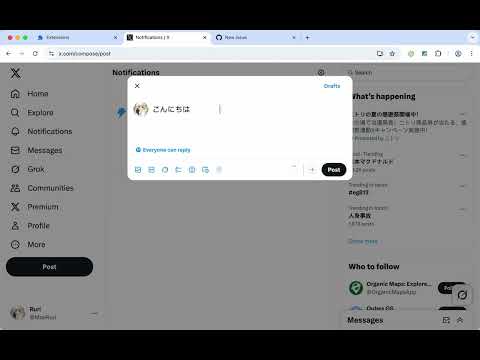
Input Translator lets you translate text directly inside any input field without switching tabs or copy-pasting. Type in your native language, trigger translation in place, and send your message instantly. POPULAR USE CASES • Chat fluently on Discord, Slack, Telegram Web, and WhatsApp Web • Write emails in Gmail and Outlook without jumping to a translator tab • Post and reply on X (Twitter), Reddit, LinkedIn, and YouTube comments • Open GitHub issues, pull requests, and code reviews in English or any target language THREE EFFORTLESS TRIGGERS • Triple Space — Press Space 3 times at the end of your text to translate immediately • Keyboard Shortcut — Press Alt+T (customizable in your browser's shortcut settings) • Context Menu — Right-click inside any input box and choose "Translate Text" FLEXIBLE TRANSLATION ENGINES • Free by Default — Works out of the box with Google Translate and Microsoft Translator, zero setup required • AI Translation with Imp Credits — Connect an Imp account for pay-as-you-go AI translation with no API key management or monthly subscription • Bring Your Own Key (BYOK) — Configure your own OpenAI API key or any OpenAI-compatible endpoint (OpenRouter, DeepSeek, etc.) for natural, context-aware translations KEY FEATURES • In-Place Replacement — Translates and replaces text directly inside standard inputs, textareas, and rich text editors • Auto-Detect Source Language — Automatically detects what you typed and translates to your chosen target language • Lightweight & Open Source — Clean UI with automatic Light & Dark mode, GPL-3.0 licensed on GitHub PRIVACY • No personal data collection or browsing history tracking • API keys stay stored locally in your browser • Text is only sent to the translation engine you configure when you explicitly trigger translation Source code: https://github.com/rxliuli/input-translator Support & Community: https://discord.gg/gFhKUthc88
4.7 out of 515 ratings
Details
- Version0.7.6
- UpdatedNovember 20, 2026
- Size181KiB
- LanguagesEnglish (United States)
- DeveloperWebsite
Email
rxliuli@gmail.com - Non-traderThis developer has not identified itself as a trader. For consumers in the European Union, please note that consumer rights do not apply to contracts between you and this developer.
Privacy

This developer declares that your data is
- Not being sold to third parties, outside of the approved use cases
- Not being used or transferred for purposes that are unrelated to the item's core functionality
- Not being used or transferred to determine creditworthiness or for lending purposes
Support
For help with questions, suggestions, or problems, please open this page on your desktop browser