

Inliter

Overview
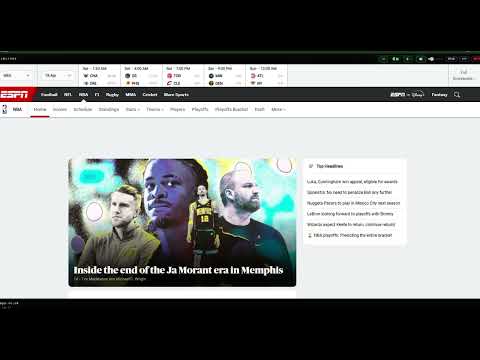
Live web monitor — captures screenshots and displays them in a floating overlay.
Stop switching tabs. Start watching the world. Inliter is a live web monitor that runs silently in the background and shows you what's happening across all your selected websites — in one floating window, automatically. No more refreshing. No more tab-hopping. Inliter captures screenshots of your sites on a schedule, detects when something changes, and alerts you instantly with a flashing badge. You stay focused on your work. Inliter stays focused on the web. --- WHO IS IT FOR? Inliter is for everyone. If you always have more than two tabs open — Inliter is for you. Whether you follow the news, sports, finance, entertainment, technology, or any topic that matters to you, Inliter keeps you updated without asking you to look. You pick the sites. Inliter watches them for you. It is also built for professionals who need to stay informed without being distracted — journalists and editors monitoring breaking news, traders and analysts watching market-moving headlines, security professionals tracking live developments, and managers who need situational awareness at a glance. --- HOW IT WORKS 1. Open Inliter and paste your list of sites, add them manually, or import from a plain .txt file — up to 50 URLs. You can edit your list at any time by clicking the SET button in the overlay. 2. Click SAVE AND START 3. Inliter opens a floating window and begins capturing 4. Every minute, it checks each site for headline changes 5. When something changes — it captures a fresh screenshot and alerts you immediately That's it. No configuration. No complexity. It just works. --- WHAT MAKES IT DIFFERENT Most news and monitoring tools push notifications that interrupt you. Inliter doesn't interrupt — it informs. The overlay window sits quietly on your screen, cycling through your sites like a personal newsroom display. When something changes, you see it. When nothing changes, it stays out of your way. - Standalone floating window — not tied to any browser tab - Automatic screenshot capture with visual change detection - FOLD mode — collapses to a slim banner when you need more screen space - Background music — optional ambient soundtrack while you monitor - Remembers your window position and size between sessions - Works across multiple monitors --- FIRST LAUNCH NOTE On first launch, Inliter captures an initial screenshot of every site in your list — this is a one-time process that takes approximately 2 seconds per site. During this time, a capture window will briefly appear and disappear for each site. It may feel a little busy for the first 30–60 seconds, but it happens only once. After that, Inliter runs completely silently in the background. Pro tip: if you have a second monitor, place the Inliter overlay there and the capture process becomes entirely invisible. That said, Inliter works perfectly well on a single screen — the initial burst passes quickly and you will barely notice it after the first time. --- YOUR DATA Inliter stores your site list and screenshots locally on your machine. Nothing is sent to any server. Your monitoring activity is entirely private. --- Start watching. Stop missing things. Developed by Michael Behagen Background music composed by Michael Behagen, arranged and performed by Michael Behagen and Tal Yaniv
0 out of 5No ratings
Details
- Version2.5.0
- UpdatedMay 5, 2026
- Offered byMichael Behagen
- Size51.43KiB
- LanguagesEnglish
- Developer
Email
mikibehagen@gmail.com - Non-traderThis developer has not identified itself as a trader. For consumers in the European Union, please note that consumer rights do not apply to contracts between you and this developer.
Privacy

This developer declares that your data is
- Not being sold to third parties, outside of the approved use cases
- Not being used or transferred for purposes that are unrelated to the item's core functionality
- Not being used or transferred to determine creditworthiness or for lending purposes