

Inline Translator
9 calificaciones
)
Descripción general
Herramienta para traducir texto seleccionado: Traduzca texto directamente en la página.
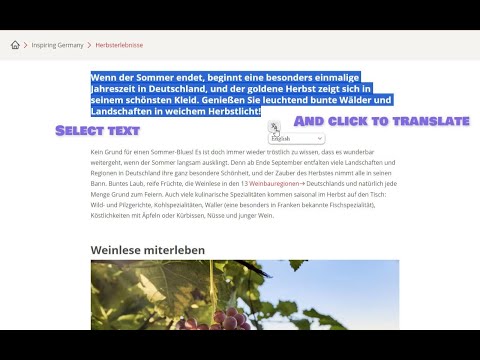
«Inline Translator» will help you quickly and most conveniently translate selected text on any website. Unlike other similar tools, this one embeds the translation directly into the HTML markup of the page, preserving the formatting and not cluttering the page with pop-ups. Main Features: • Simple and Easy: Translate text by selecting it with the mouse and clicking on the button that appears or by pressing «Alt» + «T». • No Pop-Ups: The translation is embedded in the page, preserving the original formatting. • Multiple Translated Sections: Create an unlimited number of translated sections of text on a page. You can translate as many as you want! • Original Text in the Tooltip: When you hover over a translated section of text, the original text appears in the tooltip. • Individual Control: Cancel translations individually by simply clicking on the text. The handy «Cancel» and «Cancel All» menus help you to do this. • Button Drag and Drop: If a pop-up button is in the way, just drag it. • Competent Translation of Documentation Sites: «Inline Translator» ignores <pre> and <code> tags to avoid distorting code fragments. However, if you select a text fragment inside these tags, they can be translated. • Convenient Extension Access Control: You can disable «Inline Translator» on some sites or everywhere, but you can enable it only for those sites that you need. Usage Examples: • Translate entire pages in two steps: «Ctrl» + «A» and «Alt» + «T». • Translation of individual words highlighted by double-clicking. It is not necessary to translate everything if you forgot only one word from the text. • Learn foreign languages effectively by translating only what you really need. Translation Assistance: Erika S.
3.9 de 59 calificaciones
Detalles
- Versión0.1.5
- Fecha de actualización19 de diciembre de 2023
- Ofrecido porMikulanDev
- Tamaño55.28KiB
- Idiomas55 idiomas
- Desarrollador
Correo electrónico
pavelretivoy@gmail.com - No comercianteEl desarrollador no se identificó como comerciante. Si eres un consumidor de la Unión Europea, ten en cuenta que los derechos de los consumidores no aplican a los contratos entre el desarrollador y tú.
Privacidad

Este desarrollador declara el siguiente tratamiento de tus datos:
- No se venden a terceros, excepto en los casos de uso aprobados
- No se utilizan ni transfieren para fines no relacionados con la funcionalidad principal del elemento
- No se utilizan ni transfieren para determinar tu solvencia ni ofrecer préstamos