Item logo image for Inline Question for ChatGPT

Inline Question for ChatGPT

5.0(

1 rating

)
ExtensionTools3 users
Item media 4 (screenshot) for Inline Question for ChatGPT
Item video thumbnail
Item media 2 (screenshot) for Inline Question for ChatGPT
Item media 3 (screenshot) for Inline Question for ChatGPT
Item media 4 (screenshot) for Inline Question for ChatGPT
Item video thumbnail
Item media 2 (screenshot) for Inline Question for ChatGPT
Item media 3 (screenshot) for Inline Question for ChatGPT
Item media 4 (screenshot) for Inline Question for ChatGPT

Overview

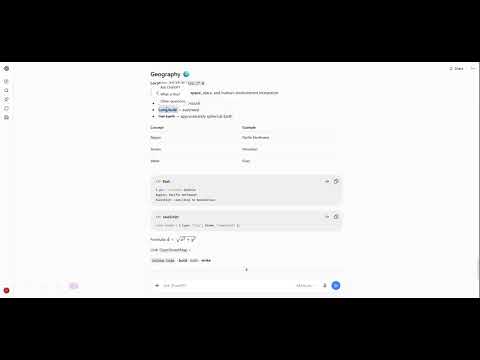
Ask quick side questions about highlighted text in ChatGPT answers without leaving your place. Not affiliated with OpenAI.

This extension boosts user experience with ChatGPT. It helps user create a forked(side) conversation from the current answer to have the question immediately answered without scrolling up and down which breaks the thinking process. Currently ChatGPT has built-in 'Ask ChatGPT' function which create a independent thread based on user selections. That's helpful but doesn't create the same user experience as this extension does. This extension includes two CUJs: CUJ1: - User has a conversation which creates a long answer. - There is a term which confuses the user. - User just wants to know what it means, and user expects it to be a short one line answer, and don't want to do things like quote the sentence that contains the term and ask about that term and maybe add additional prompts to make it short and goes back to the original answer where the term appears. - User selects the text, there is a context menu with an option 'Ask ChatGPT' which is native to ChatGPT web, and several other customized options like 'What is this?', 'Source of truth?' which is defined by this extension. - Since user wants to know the meaning of the term, he clicks 'What is this?' - A popup message box shows the answer, the popup is like a tooltip, which shows on mouseover and can be copied - the popup message box is consisted of the question(gray background rounded span in one line) and the answer - initially has a max width and height of 40rem, can be resized. - can be closed by clicking anywhere outside - has a X close button on top right - has a garbage bin button on top left, on clicking it, it pops up a browser native alert to ask if delete the current message box. - at the time the popup message box is created, the message locator together with the side conversation is saved - once user close the message box, it can be opened again by hovering on the highlighted text CUJ2: - User wants to change the settings of this extension - User opens the options page by right click the extension and select 'Options' where it opens a new web page - Settings are saved immediately when changed. This two CUJs cover the pain point where a separate long answer in another long answer would add to the burden of understand.

Details

  • Version
    0.1.0
  • Updated
    October 2, 2026
  • Offered by
    shironeko1052
  • Size
    245KiB
  • Languages
    English (United States)
  • Developer
    Email
    shironeko1052@gmail.com
  • Non-trader
    This developer has not identified itself as a trader. For consumers in the European Union, please note that consumer rights do not apply to contracts between you and this developer.

Privacy

Manage extensions and learn how they're being used in your organization
The developer has disclosed that it will not collect or use your data. To learn more, see the developer’s privacy policy.

This developer declares that your data is

  • Not being sold to third parties, outside of the approved use cases
  • Not being used or transferred for purposes that are unrelated to the item's core functionality
  • Not being used or transferred to determine creditworthiness or for lending purposes

Support

For help with questions, suggestions, or problems, visit the developer's support site

Google apps