

InkWho — AI Writing Detector
3 ratings
)
Overview
Spot signs of AI writing on webpages or in your own text. Private, on-device checks. Free, with no sign-up.
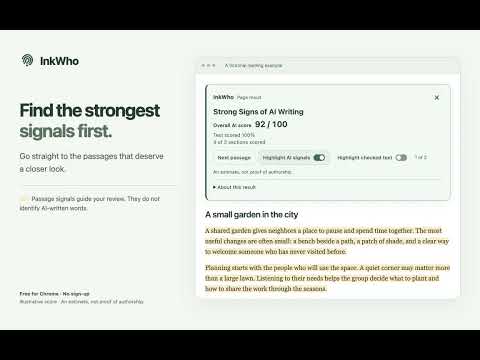
Spot signs of AI writing. Right where you read. InkWho is a free AI writing detector for Chrome. Check an English webpage, explore a selected passage, or paste your own text—all without leaving your browser. Your text stays on your device, and no account or subscription is required. CHECK THE WAY YOU READ • Get one clear overall AI Writing Score on the page, with a view of how much text was checked. • Select a passage for a focused check, or turn on section scores to explore the details. • Paste English text or open a TXT file in Check text. Importing a file does not start analysis automatically. • Read the compact signal scale, then open the matching sections for a closer look. Sections may combine or split paragraphs. KEEP YOUR TEXT PRIVATE • Text analysis happens on your device. Your text is never uploaded for analysis. • Use InkWho without creating an account or signing up for a subscription. STAY IN CONTROL • Pause a website, switch automatic checks off, or adjust your reading preferences. • Copy or share a result, or save and print a report from Check text. Copy text & result includes the selected passage when you choose that action. • Optionally keep recent results on your device. Result history is off by default and does not save the original text. GET STARTED Add InkWho to Chrome, allow access to a public English webpage, and read the result. For your own writing, open Check text from the extension menu. The model is included in the extension, so installation and the first check may take a little longer. Check text accepts up to 100,000 characters. UNDERSTANDING YOUR RESULT InkWho is an English-language beta. A higher score means stronger signs of AI-like writing; it is not proof of who wrote the text or a percentage of AI-written words. Results can be wrong, and short or unsupported passages may not receive a score. Use results as a reading aid and review the text yourself before drawing conclusions about someone's work. On supported AI chat pages, InkWho also considers website context. This experimental adjustment applies automatically and is explained in the result when used. A reply can contain copied or quoted human writing; its location does not prove the original author. Website: https://inkwho.app/ Product tour: https://www.youtube.com/watch?v=qXy8FDF3BVk Help: https://inkwho.app/help Support: support@inkwho.app Privacy policy: https://inkwho.app/privacy
5 out of 53 ratings
Details
- Version0.2.55
- UpdatedOctober 23, 2026
- Offered byinkwho.app
- Size218MiB
- LanguagesEnglish
- Developer
Email
support@inkwho.app - Non-traderThis developer has not identified itself as a trader. For consumers in the European Union, please note that consumer rights do not apply to contracts between you and this developer.
Privacy

InkWho — AI Writing Detector has disclosed the following information regarding the collection and usage of your data. More detailed information can be found in the developer's privacy policy.
InkWho — AI Writing Detector handles the following:
This developer declares that your data is
- Not being sold to third parties, outside of the approved use cases
- Not being used or transferred for purposes that are unrelated to the item's core functionality
- Not being used or transferred to determine creditworthiness or for lending purposes
Support
For help with questions, suggestions, or problems, visit the developer's support site