

Inkscape editor for draws and graphics

ภาพรวม
Create or edit vector graphics such as illustrations, diagrams, line arts, charts, logos and complex paintings
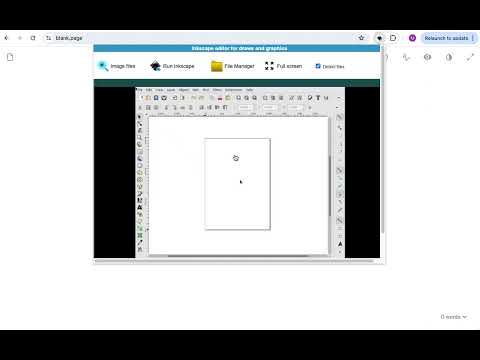
Inkscape editor for draws and graphics is a web extension to create or edit vector graphics such as illustrations, diagrams, line arts, charts, logos and complex paintings. It is an integration with the Linux Desktop app Inkscape, which is an open-source vector graphics editor similar to Adobe Illustrator, Corel Draw, Freehand, or Xara X. What sets Inkscape apart is its use of Scalable Vector Graphics (SVG), an open XML-based W3C standard, as the native format. It is is a vector graphic editor integrated with our file manager to manage only graphic file types with this desktop app. Inkscape features are: Object creation - Drawing: pencil tool (freehand drawing with simple paths), pen tool (creating Bézier curves and straight lines), calligraphy tool (freehand drawing using filled paths representing calligraphic strokes) - Shape tools: rectangles (may have rounded corners), ellipses (includes circles, arcs, segments), stars/polygons (can be rounded and/or randomized), spirals - Text tool (multi-line text, full on-canvas editing) Object manipulation - Transformations (moving, scaling, rotating, skewing), both interactively and by specifying exact numeric values - Grouping objects ("select in group" without ungrouping, or "enter the group" making it a temporary layer) - Layers (lock and/or hide individual layers, rearrange them, etc; layers can form a hierarchical tree) Alignment and distribution - Fill and stroke - Color selector (RGB, HSL, CMYK, color wheel, CMS) - Color picker tool - Copy/paste style - A gradient editor capable of multi-stop gradients - Pattern fills (bitmap/vectors) - Dashed strokes, with many predefined dash patterns - Path markers (ending, middle and/or beginning marks, e.g. arrowheads) Text support - Multi-line text - Kerning, letterspacing, linespacing adjustments - Text on path (both text and path remain editable) - Alpha transparency support for display and PNG export File formats - Perfectly compliant SVG format file generation and editing - Live watching and editing the document tree in the XML editor This extension uses the platform http://www.offidocs.com from which this software is served. It is an integration with Inkscape Linux desktop application. In concrete, it is a desktop app running through our OffiDocs API. It is available for free online users but it also allows the integration with premium users and on-premises OffiDocs deployments where the OffiDocs Inkscape is installed. IMPORTANT: This extension scans the URLs browsed in order to detect image and vector graphic files. The image and vector graphic files detected appear in a file list located in the extension popup that are retrieved from our servers. The scanning is performed from our servers so your URL are reported to our system. No personal data is collected. This scan can be disabled with a checkbox that appears in the extension popup. If you disable this scanning, this functionality is not available so then the extension functionality is very limited.
3.1 จาก 5 คะแนนการให้คะแนน 194 รายการ
รายละเอียด
- รุ่น3.0.8
- อัปเดตแล้ว26 สิงหาคม 2567
- ขนาด423KiB
- ภาษา18 ภาษา
- นักพัฒนาซอฟต์แวร์
- ไม่ใช่ผู้ค้านักพัฒนาซอฟต์แวร์รายนี้ไม่ได้ระบุว่าตัวเองเป็นผู้ค้า สำหรับผู้บริโภคในสหภาพยุโรป โปรดทราบว่าสิทธิของผู้บริโภคไม่มีผลกับสัญญาระหว่างคุณกับนักพัฒนาซอฟต์แวร์รายนี้
ความเป็นส่วนตัว

Inkscape editor for draws and graphics ได้เปิดเผยข้อมูลต่อไปนี้ซึ่งเกี่ยวกับการเก็บรวบรวมและการใช้ข้อมูลของคุณ ดูข้อมูลโดยละเอียดเพิ่มเติมได้ที่privacy policyของนักพัฒนาแอป
Inkscape editor for draws and graphics จะจัดการสิ่งต่อไปนี้
นักพัฒนาซอฟต์แวร์รายนี้ประกาศว่าข้อมูลของคุณจะ
- ไม่ถูกขายไปยังบุคคลที่สามหากไม่ใช่ Use Case ที่ได้รับอนุมัติ
- ไม่ถูกใช้หรือถูกโอนเพื่อวัตถุประสงค์ที่ไม่เกี่ยวข้องกับฟังก์ชันการทำงานหลักของรายการ
- ไม่ถูกใช้หรือถูกโอนเพื่อพิจารณาความน่าเชื่อถือทางเครดิตหรือเพื่อวัตถุประสงค์การให้สินเชื่อ
สนับสนุน
โปรดเปิดหน้านี้บนเบราว์เซอร์ในเดสก์ท็อป หากมีข้อสงสัย ต้องการขอคำแนะนำ หรือประสบปัญหาใดๆ