


Overview
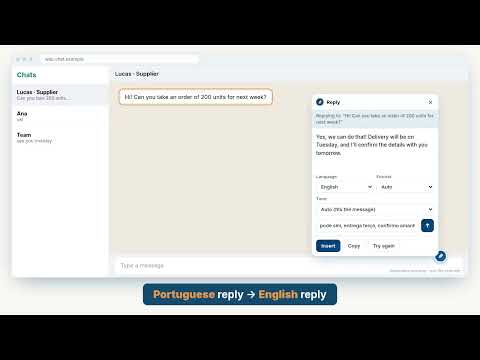
AI writes your email, chat or LinkedIn reply in the reader's language, in your tone. Gmail, WhatsApp, Outlook. Private by design.
Think in yours. Send in theirs. You think best in your own language. The person you're writing to reads best in theirs. Inkaret closes the gap. Type a few rough notes in Spanish, Portuguese, Arabic, Hindi or any language you type in (even a mix of two). Pick the language you want to send in, and Inkaret writes the full, polished email, chat message or reply right inside the text box you're already using. No copy-pasting into a translator. No translating in your head first. Just click the pen. WORKS WHERE YOU ALREADY WRITE A small pen sits in the corner of message boxes in Gmail, WhatsApp Web, LinkedIn, Outlook and most other sites with a normal text box. You can also right-click any text you've selected. WHAT IT DOES • Write: rough notes in, full message out, in the language you choose. • Reply: select the message you received, type your answer in a few words, and get a complete reply in the sender's language. • Correct: fix spelling and grammar without changing your words. • Rephrase and Shorten: say it more clearly, or in half the length. • Change tone: friendly, professional, formal, casual and more. • Notes for the AI: ask for a change ("warmer", "mention the refund") and Inkaret reworks what's on screen. Or select one sentence and redo only that. MADE FOR PEOPLE WHO WRITE IN A SECOND LANGUAGE Write your notes in one language and send the message in another. Or stay in yours: by default, each sentence comes back in the language you wrote it in. A mix of languages stays a mix when you want it to, and becomes one clean language when you ask. WRITES LIKE YOU WORK Tell Inkaret what you do, and every result fits the way you write at work. PRIVATE BY DESIGN • Nothing you write is stored on our servers. • Card numbers, government ID numbers, phone numbers and email addresses are hidden before the AI sees your text, then put back in the result. (People's names are not hidden.) • Inkaret reads a text box only when you click the pen or pick an action. It never reads pages in the background, and nothing is checked or underlined while you type. • Password, card and one-time-code fields are never touched. • Hide the pen on any site with one click. HOW TO START 1. Install Inkaret. The sign-in page opens by itself. 2. Sign in with Google or your email — no password, no card. 3. Click the pen in any text box. Think in yours. Send in theirs. PRICING Free to start, no card needed. Every plan has every feature. • Basic: free, always, with a set of credits every month. One credit is one normal message, like a chat reply or a short email. • Paid plans give you more credits, with no daily limit, and never renew by themselves. • Credit packs add extra credits on top of any plan, Basic included. Current plans and prices: https://inkaret.com/pricing/ Support: https://inkaret.com/contact/
5 out of 51 rating
Details
- Version0.0.6
- UpdatedNovember 1, 2026
- Size236KiB
- Languages4 languages
- DeveloperMICRONSTARSWebsite
25, Kalapi society 1, Near hathi mandir Surat, Gujarat 395004 INEmail
support@micronstars.comPhone
+91 63545 40630 - TraderThis developer has identified itself as a trader per the definition from the European Union and committed to only offer products or services that comply with EU laws.
- D-U-N-S304144246
Privacy

Inkaret – Write & reply in any language has disclosed the following information regarding the collection and usage of your data. More detailed information can be found in the developer's privacy policy.
Inkaret – Write & reply in any language handles the following:
This developer declares that your data is
- Not being sold to third parties, outside of the approved use cases
- Not being used or transferred for purposes that are unrelated to the item's core functionality
- Not being used or transferred to determine creditworthiness or for lending purposes
Support
For help with questions, suggestions, or problems, please open this page on your desktop browser