


概要
InfraNodusを使用して、テキストのギャップを特定し、新しいアイデアを生み出します。
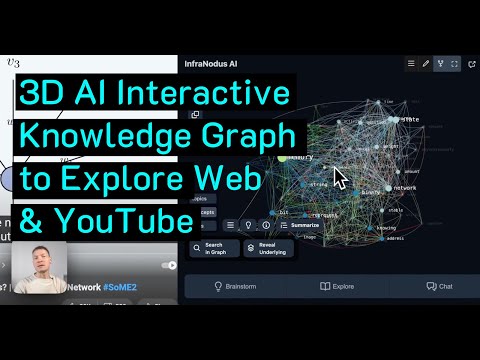
Use an interactive knowledge graph as a thinking tool to explore the content on the web and generate new insights. With InfraNodus, you can identify the main topics in any content and find the blind spots between them. Use the built-in AI to generate summaries, bridge the content gaps, generate new ideas, chat with the content, and find what everyone else is missing. Perfect for visual thinkers, researchers, writers, marketing and SEO specialists. InfraNodus AI extension generates interesting research questions and prompts for • YouTube videos • major AI chatbots (including ChatGPT, Claude, Gemini, Grok, and Manus AI) • Google and Bing search results • scientific articles • social media feeds • web pages • NEW: optimizing Claude Skills using the gap questions and text structure feedback Unlike other AI-based tools, this extension does not just provide a summary. It takes you one step further and helps you explore the text using the graph and come up with ideas that can develop the discourse in an interesting direction. The extension uses InfraNodus’ network analysis algorithm in combination with AI (GPT-4 or GPT-4o if you choose it in the settings) to build a knowledge graph from your content. It will then apply network analysis metrics to detect the structural gaps in a text and reveal the blind spots in ideas. InfraNodus will then generate interesting questions that bridge those gaps and help you develop any discourse further. --- IMPORTANT: You can use the extension for free for a limited number of requests per hour. If you like the extension, please, consider registering an account at InfraNodus.Com to increase your quota and to support our product. You can register for a free trial at https://infranodus.com InfraNodus already includes GPT-4/5 / Gemini / Claude / Grok access, so you do not need a ChatGPT / OpenAI / Claude / Grok account to use the InfraNodus AI extension. -- SETTINGS: By default, the extension can be activated with a floating button, but you can remove the button in the extension's settings and pin it in the browser toolbar if you prefer not to have any overlays on your content. We recommend to set "Graph" as the default view and use it to navigate through your content. The default analysis granularity are the concepts, but you can set the Text Analysis to retrieve entities, which will then result in sparser graphs that will only show the entities extracted from a document. -- SUPPORT: Please, send us your feedback, support questions, and feature requests via https://support.noduslabs.com or our Discord channel — happy to connect!
5 点満点で 512 件の評価
詳細
プライバシー

InfraNodus:YouTube、ChatGPT、Google 検索向けの AI グラフ要約 から、お客様のデータの収集と使用に関する以下の情報が開示されています。 詳しくは、デベロッパーの privacy policy をご確認ください。
InfraNodus:YouTube、ChatGPT、Google 検索向けの AI グラフ要約 は次を扱います。
このデベロッパーは、お客様のデータについて以下を宣言しています
- 承認されている以外の用途で第三者に販売しないこと
- アイテムの中心機能と関係のない目的で使用または転送しないこと
- 信用力を判断する目的または融資目的で使用または転送しないこと
サポート
質問や提案、問題がある場合は、パソコンのブラウザでこのページを開いてください