


Overview
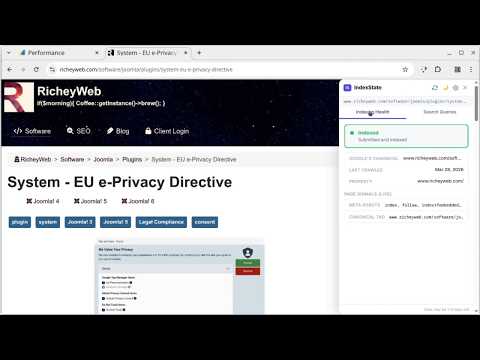
See what Google really thinks about this page — indexing status and top search queries from Google Search Console.
IndexState brings your Google Search Console data to the page you're on — no tab switching, no URL copying, no context switching. If you publish content, manage a website, or do SEO work, you've spent time pasting URLs into Google Search Console just to answer two questions: is this page indexed, and what are people searching to find it? IndexState answers both questions instantly, right on the page you're looking at. HOW IT WORKS Click the IS button on any page on your verified Google Search Console properties. A sidebar slides open showing: Indexing Health — Google's exact verdict on the page (Indexed, Crawled but not indexed, Blocked, etc.), the specific reason, Google's chosen canonical URL versus the one declared on the page, the last crawl date, and live client-side signals including the meta robots tag and canonical tag read directly from the page. Search Queries — the top search queries driving impressions and clicks to this exact URL, with impressions, clicks, CTR, and average position. Switch between 7, 28, and 90 day views. Rows with high impressions and low CTR are highlighted as optimization opportunities — the queries where a better title or meta description could move the needle. WHAT MAKES IT DIFFERENT Most SEO tools give you dashboards. IndexState gives you context. The data appears on the page you're editing or reviewing, when you need it, without interrupting your workflow. There is no account to create. No subscription. No data leaving your browser. IndexState talks directly to Google's APIs using your own credentials — the same credentials you already use to access Google Search Console. SETUP IndexState uses your own Google Cloud OAuth credential, which takes about 5 minutes to create and is completely free. A built-in setup wizard walks you through every step — creating a project, enabling the API, creating the credential, and connecting your account. Once connected, IndexState automatically activates on any page belonging to your verified Search Console properties and stays completely silent everywhere else. FEATURES - Indexing verdict with exact coverage state from Google - Canonical mismatch detection — know immediately when Google is using a different canonical than the one you declared - Last crawl date - Live page signals — meta robots and canonical tag read directly from the DOM - Top 15 search queries for the current URL - Impressions, clicks, CTR, and average position - 7, 28, and 90 day date range selector - Opportunity flagging for high-impression, low-CTR queries - Smart caching — indexing data cached 3 hours, query data cached 8 hours, keeping usage well within Google's API limits - Badge position — choose any corner of the screen - Light and dark theme - Sidebar slides in from whichever side the badge is on - Works on all your verified Search Console properties PRIVACY IndexState has no backend server. No data is collected, transmitted, or shared with the extension developer. Your OAuth token and Search Console data are stored locally in Chrome's extension storage on your own machine. The extension communicates only with Google's APIs. QUOTA Each user connects with their own Google Cloud credential. Google's URL Inspection API allows 2,000 requests per day per property. With IndexState's caching, a typical user checking 30 to 100 pages per day uses a small fraction of that limit. PERMISSIONS IndexState requests only the permissions it needs: - identity: to authenticate with your Google account - activeTab: to read the URL of the page you are on - storage: to cache API results and store your settings - tabs: to open the sidebar on the current tab - scripting: to inject the sidebar into pages on your verified sites
1 out of 51 rating
Details
- Version1.0.4
- UpdatedApril 23, 2026
- Size31.79KiB
- LanguagesEnglish (United States)
- Developer
- Non-traderThis developer has not identified itself as a trader. For consumers in the European Union, please note that consumer rights do not apply to contracts between you and this developer.
Privacy

This developer declares that your data is
- Not being sold to third parties, outside of the approved use cases
- Not being used or transferred for purposes that are unrelated to the item's core functionality
- Not being used or transferred to determine creditworthiness or for lending purposes
Support
For help with questions, suggestions, or problems, visit the developer's support site