

Incognito Chat Saver - save your Incognito chat on your computer.

Overview
Save AI incognito chats as a .txt file on your computer. No data sent anywhere.
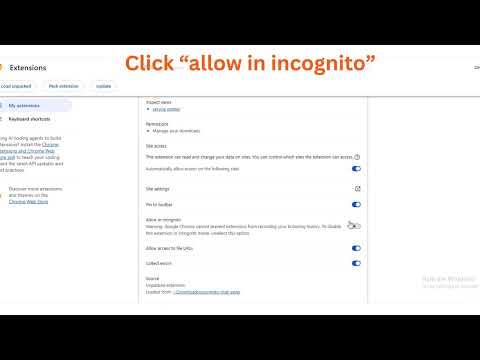
Save AI chats from incognito windows as a .txt file on your computer. One click. Nothing is sent anywhere. Incognito chats disappear the moment you close the window. If you want to keep one, you have to copy it by hand. Incognito Chat Saver does it for you. HOW IT WORKS 1. Open an AI chat, in a normal or an incognito window. 2. Click the extension icon, then "Save this chat". 3. A .txt file lands in your Downloads folder, named after the chat title and the AI service. Every message is labeled with who said it: User: ... AI name: ... SUPPORTED SITES Built for the popular AI chat, with a best-effort mode for the rest. The saved file tells you when speakers were guessed. BUILT FOR PRIVACY • Nothing is sent anywhere. No servers, no accounts, no analytics. • It reads a page only when you click the button. It never reads a page you didn't choose. • The chat is held in the extension only until Chrome confirms the download, then it is deleted from the extension. • The only copy left is the file on your computer. DETAILS • Long chats: if older messages have to be loaded, the extension scrolls up for you, then puts you back where you were. A small animation shows it is working. • Saves plain text, with lists and code blocks kept readable. Images and attachments are not saved. • If something goes wrong, the chat stays in the extension and you can retry the download. ONE-TIME SETUP FOR INCOGNITO Chrome turns extensions off in incognito by default. Open chrome://extensions, click Details on Incognito Chat Saver, and switch on "Allow in Incognito". You only do this once. Not affiliated with any AI company.
0 out of 5No ratings
Details
- Version1.0.3
- UpdatedNovember 21, 2026
- Offered byThe404
- Size40.13KiB
- LanguagesEnglish
- Developer
Email
shabbirkimgbrand55@gmail.com - Non-traderThis developer has not identified itself as a trader. For consumers in the European Union, please note that consumer rights do not apply to contracts between you and this developer.
Privacy

Incognito Chat Saver - save your Incognito chat on your computer. has disclosed the following information regarding the collection and usage of your data. More detailed information can be found in the developer's privacy policy.
Incognito Chat Saver - save your Incognito chat on your computer. handles the following:
This developer declares that your data is
- Not being sold to third parties, outside of the approved use cases
- Not being used or transferred for purposes that are unrelated to the item's core functionality
- Not being used or transferred to determine creditworthiness or for lending purposes