

Inbuilt Video Editor for X (Twitter)

Overview
iPhone-style trim & crop built into the X / Twitter post composer. Fast, private export — nothing leaves your machine.
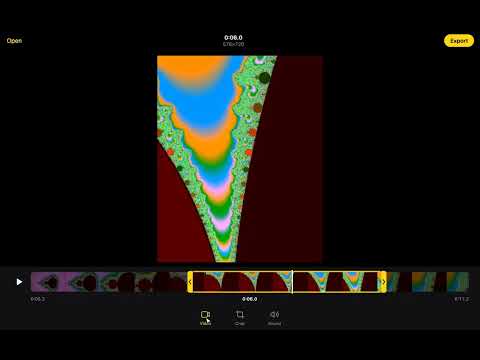
X on the web has no video editor. This adds one, right inside the post composer. Attach a video like normal, press the new "Edit video" button next to GIF, trim and crop it, then press Done. The edited clip replaces the one in your post. FEATURES • Trim with a filmstrip and drag handles. Hold the middle of the selection to slide it, tap to jump, or drag the playhead to scrub. • Crop freeform or to Original, 16:9, Square, 4:5 or 9:16 • Mute the sound • Fast export to an H.264 MP4 that X accepts, usually in a few seconds • Works with iPhone videos, including HEVC and portrait clips • Warns when a clip is over X's 2:20 limit for non-Premium accounts • Click the toolbar icon to use the editor on its own page and download the MP4 PRIVATE BY DESIGN Everything happens in your browser. The extension requests no permissions, makes no network requests and collects no data. Open source: https://github.com/danialbka/twitter-editor-inbuilt Not affiliated with or endorsed by X Corp.
0 out of 5No ratings
Details
- Version1.2.0
- UpdatedSeptember 29, 2026
- Offered bydanialbka
- Size196KiB
- LanguagesEnglish
- DeveloperMuhammad Danial Bin Khairilamri
Email
danial99175@gmail.com - Non-traderThis developer has not identified itself as a trader. For consumers in the European Union, please note that consumer rights do not apply to contracts between you and this developer.
Privacy

This developer declares that your data is
- Not being sold to third parties, outside of the approved use cases
- Not being used or transferred for purposes that are unrelated to the item's core functionality
- Not being used or transferred to determine creditworthiness or for lending purposes
Support
For help with questions, suggestions, or problems, visit the developer's support site