


Overview
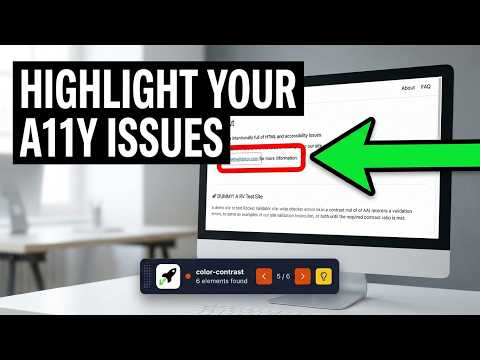
Highlights elements flagged by Rocket Validator's accessibility reports.
Click "Highlight" on any accessibility report in Rocket Validator. The audited page opens in a new tab with every failing element outlined, the first one scrolled into view, and the page rendered at the same viewport the scanner used. A floating badge shows the rule name, impact level, and Previous / Next controls to step through each element. For color-contrast issues, a side panel shows the measured ratio, the required ratio, and the foreground / background swatches. Matching the scan viewport — width, height, device pixel ratio, mobile flag, user agent — means layout-dependent issues like color-contrast, target-size, and overflow appear exactly where the report says they are. Built for developers, QA engineers, designers, and content editors fixing accessibility issues found by Rocket Validator. A Rocket Validator Pro account is needed to generate the accessibility reports — sign up at https://rocketvalidator.com
0 out of 5No ratings
Details
- Version0.3.1
- UpdatedJuly 16, 2026
- FeaturesOffers in-app purchases
- Size426KiB
- LanguagesEnglish
- DeveloperWebsite
Email
hello@lighthous.es - Non-traderThis developer has not identified itself as a trader. For consumers in the European Union, please note that consumer rights do not apply to contracts between you and this developer.
Privacy

This developer declares that your data is
- Not being sold to third parties, outside of the approved use cases
- Not being used or transferred for purposes that are unrelated to the item's core functionality
- Not being used or transferred to determine creditworthiness or for lending purposes
Support
For help with questions, suggestions, or problems, visit the developer's support site