

Imskir: Search Scryfall with Natural Language
1 rating
)
Overview
Search scryfall using natural language
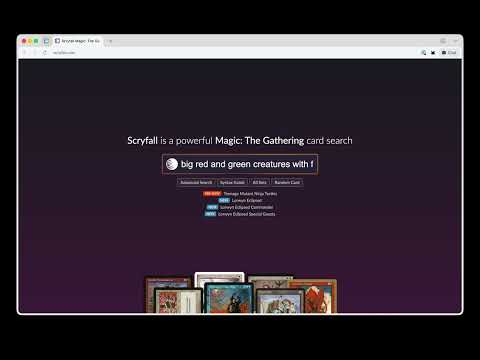
Stop memorizing Scryfall's search syntax. Just describe what you're looking for. Imskir lets you search Scryfall the way you think. Instead of learning complex query operators, type natural language like "big red and green creatures with flying" and Imskir automatically translates it into Scryfall syntax (e.g. c:rg t:creature pow>=4 o:flying). How it works: - Type a natural language search into the Scryfall search bar - Imskir translates your query into Scryfall syntax using AI - The translated query runs on Scryfall as normal Features: - Works directly on scryfall.com — no separate app or tab needed - Supports specific card name lookups for precise results - Visual indicator shows when the extension is active and processing - Choose your preferred AI provider: Google, Anthropic, or OpenAI - Bring your own API key — your key, your usage, your control - Toggle on/off anytime from the extension popup Getting started: 1. Install the extension 2. Click the Imskir icon and enter your API key for Google, Anthropic, or OpenAI 3. Go to scryfall.com and search in plain English Note: This extension requires an API key from a supported AI provider (Google, Anthropic, or OpenAI). API usage is billed directly by your chosen provider.
5 out of 51 rating
Details
- Version0.0.4
- UpdatedMarch 30, 2026
- Size318KiB
- LanguagesEnglish
- Developer
Email
braedongough@gmail.com - Non-traderThis developer has not identified itself as a trader. For consumers in the European Union, please note that consumer rights do not apply to contracts between you and this developer.
Privacy

This developer declares that your data is
- Not being sold to third parties, outside of the approved use cases
- Not being used or transferred for purposes that are unrelated to the item's core functionality
- Not being used or transferred to determine creditworthiness or for lending purposes