


總覽
WebXR Emulator for Meta Quest devices
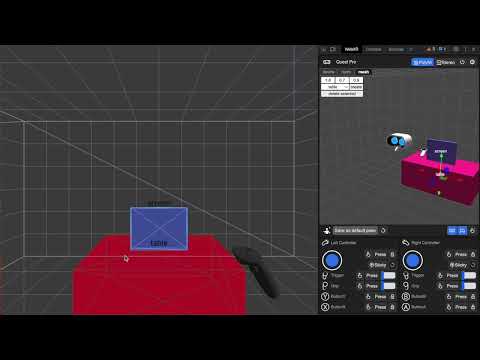
Immersive Web Emulator helps WebXR developers build and test Meta Quest browser experiences from a desktop Chromium browser, without needing a physical headset for every iteration. IWE 2.0 uses an explicit per-site workflow. Pin the Immersive Web Emulator button to your browser toolbar, open a WebXR page, then click the IWE button to enable emulation for that site. The page reloads with a simulated WebXR runtime, Meta Quest device profile, in-page live controls, and optional mixed reality environment data. Key Features - Simulate Meta Quest WebXR support on selected pages - Enter immersive VR/AR sessions from desktop Chromium-based browser - Move and rotate the headset, controllers, and hands from the in-page overlay - Simulate controller buttons, triggers, grips, thumbsticks, hand poses, and pinch input - Switch between controller and hand-tracking input modes - Configure persistent defaults in DevTools > WebXR, including device, environment, stereo rendering, IPD, and FOV - Test WebXR features including gamepads, hands, hit test, plane/mesh detection, anchors, and synthetic environments - Optional local bridge for coding agents and automation tools to inspect and drive the emulator during development How to Use 1. Install the extension and pin Immersive Web Emulator to the toolbar. 2. Open a WebXR app, such as: https://threejs.org/examples/webxr_xr_cubes 3. Click the IWE toolbar button to enable emulation for the current site. 4. After the page reloads, use the in-page overlay to control the simulated headset and inputs. 5. Open DevTools > WebXR to adjust persistent emulator settings. Unlike earlier versions, IWE no longer turns on automatically for every page. Emulation is enabled only for sites where you activate it with the toolbar button. Developer Resources https://github.com/meta-quest/immersive-web-emulation-runtime
4.7 分 (滿分 5 分)25 個評分
詳細資料
- 版本2.0.0
- 已更新2026年7月9日
- 提供者Meta
- 大小10.12MiB
- 語言English
- 開發人員Meta Platforms, INC.
1 Meta Way Menlo Park, CA 94025 US電子郵件
extensions@fb.com電話
+1 650-543-4800 - 交易商這位開發人員表明自己是交易商 (依歐盟的定義),並承諾只提供符合歐盟法律的產品或服務。
- 鄧白氏環球編碼196337864
隱私權

這位開發者就你的資料做出下列聲明:
- 除經核准的用途外,不會將你的資料販售給第三方
- 不會基於與商品核心功能無關的目的,使用或轉移資料
- 不會為了確認信用度或基於貸款目的,使用或轉移資料
支援
如有疑問或建議,請前往開發人員的支援網站