


Przegląd
WebXR Emulator for Meta Quest devices
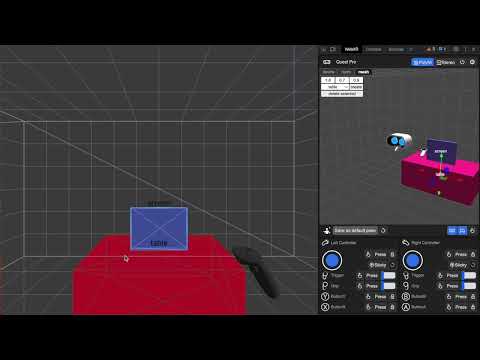
Develop WebXR experiences efficiently and effectively on Meta Quest with Immersive Web Emulator. This browser extension provides a user-friendly interface and is capable of simulating all Meta Quest headsets, enabling developers to easily test and iterate their WebXR experiences without a physical XR device. Key Features - Interactive 3D viewport to easily transform manipulation of the VR headset and the controllers - Simulate controller input, binary input (buttons), and analog input (trigger, grip, joysticks) - Simulate hand input, including built-in hand poses and pinch gesture control - Keyboard action mapping for added efficiency - Keyboard input relay The extension is built on top of the WebExtensions API, and implements the newly introduced Chrome Extension Manifest V3, which means that it will operate with enhanced security and performance on most Chromium-based desktop browsers. How to Use It - Download the extension from this page. - Navigate to a WebXR app, such as this Three.js example: https://threejs.org/examples/webxr_xr_dragging The app will detect WebXR support as if you are visiting from the specified Meta Quest device, and let you enter immersive (AR/VR) mode. - Launch the desktop browser’s developer tool panel, and navigate to the “WebXR” tab to control the emulated device. Developer Resources - Learn more about Immersive Web Emulator: https://developer.oculus.com/blog/webxr-development-immersive-web-emulator/ - Find detailed instructions on using Immersive Web Emulator: https://github.com/meta-quest/immersive-web-emulator#immersive-web-emulator-usage
4,7 na 524 oceny
Szczegóły
- Wersja1.5.0
- Zaktualizowano20 grudnia 2023
- SprzedawcaMeta
- Rozmiar700KiB
- JęzykiEnglish
- DeweloperMeta Platforms, INC.
1 Meta Way Menlo Park, CA 94025 USE-mail
extensions@fb.comTelefon
+1 650-543-4800 - PrzedsiębiorcaTen programista określił siebie jako przedsiębiorcę zgodnie z definicją Unii Europejskiej i zobowiązał się oferować tylko produkty i usługi zgodne z przepisami obowiązującymi w UE.
- Numer D-U-N-S196337864
Prywatność
Ten wydawca oświadcza, że Twoje dane
- nie są sprzedawane osobom trzecim (z wyjątkiem uzasadnionych przypadków)
- nie są używane ani przesyłane w celach niezwiązanych z podstawową funkcją produktu,
- nie są używane ani przesyłane w celu ustalenia zdolności kredytowej lub udzielania pożyczek.
Pomoc
Jeśli masz pytania, sugestie lub problemy, wejdź na stronę pomocy dla deweloperów