Item logo image for Immersion Tracker

Immersion Tracker

ExtensionEducation4 users
Item media 5 (screenshot) for Immersion Tracker
Item media 1 (screenshot) for Immersion Tracker
Item media 2 (screenshot) for Immersion Tracker
Item media 3 (screenshot) for Immersion Tracker
Item media 4 (screenshot) for Immersion Tracker
Item media 5 (screenshot) for Immersion Tracker
Item media 1 (screenshot) for Immersion Tracker
Item media 2 (screenshot) for Immersion Tracker
Item media 3 (screenshot) for Immersion Tracker
Item media 4 (screenshot) for Immersion Tracker
Item media 5 (screenshot) for Immersion Tracker

Overview

Track your language immersion time across YouTube and other sources, and measure your progress through comprehension tracking.

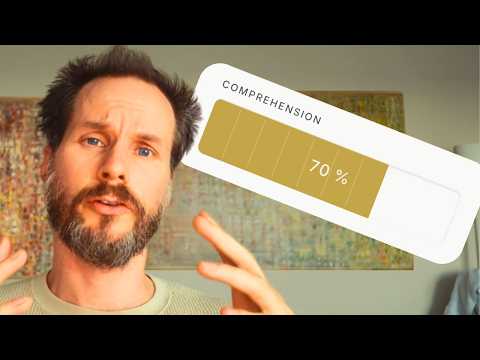
Immersion Tracker counts every minute you spend with your target language, automatically and manually. Automatic YouTube Tracking The extension tracks your YouTube watch time in the background. Set your YouTube handle once, and it counts every video you watch on that profile. Switch accounts freely, only your configured profile is tracked. Shorts can be excluded. Session Timer Start a focused session in one click from the toolbar icon. The timer runs in the background, no tab needs to stay open. When you stop, pick a category and optionally add a label (show title, episode, book). Manual Entry Add immersion time in 3 clicks: pick +10, +30, or +60 minutes, select a category, hit Add. Available in the popup and as a permanent form in the dashboard. Counts toward your daily total and all active challenges. Comprehension Tracking (optional) After saving a session: "How much did you understand?" Set 0–100% on a visual bar, or skip. Off by default, enable in Settings. Stats & Dashboard Open the full dashboard for: period tiles (Today, This Week, This Month, Since Start), bar charts, a 30-day heatmap, streak tracker, daily steps, immersion sources breakdown, top channels, top videos, and full session and video history. Challenges Set a time-bound immersion goal (e.g. 1000 hours by Easter). The dashboard shows hours completed, hours remaining, days left, and hours/day needed. Data All data is stored locally in your browser. Export as TSV or JSON, import from backup, delete by video, channel, or time range. # Immersion Tracker — Release Notes --- ## v0.5.0 — 2026-05-15 ### New - **Comprehension Progress section** — A new dashboard section (between Top Videos and Video History) that surfaces content you rewatched *and* understood better over time. An entry appears only when it was logged 2+ times with a comprehension score and the score rose (latest higher than first). Sources are mixed: YouTube videos, manual entries, and sessions. Sorted by improvement, then by efficiency (same gain in less time ranks higher). Each row shows the time span from first to last scored viewing, total time, replay count, and a `40 % → 80 % +40` improvement chip — and expands to the individual viewings. ### New - **Comprehension prompt timing** — You can now choose *when* the YouTube comprehension prompt appears: **midway** through a video (after half your real watch time, capped at 10 minutes — the video pauses for the prompt and resumes after you save) or **at the end**. Set it in the reworked "Comprehension prompt" settings card, which now also holds the manual-entry ask frequency in one place. ### Changed - **Default settings** — Comprehension tracking is now on by default; the popup opens on the Stats tab. - **Daily-goal threshold dots** — The five dots now sit at even steps (20 / 40 / 60 / 80 / 100 % of the daily goal). Beat your goal by 10 % or more and the whole row quietly starts to glow, with a line showing how far over you are — a small hidden reward for going past the goal. - **Comprehension auto-prompt position** — The "how much did you understand?" prompt now appears as a card centered over the video player with a dimmed backdrop, instead of a banner at the bottom edge of the page. It is injected into the player container, so it is also visible in theater and fullscreen mode. The 60-second auto-dismiss was removed — it stays until you answer or skip. - **Auto-prompt trigger simplified** — The prompt now appears only when a video finishes, not when you switch away from the tab. The tab-switch trigger built the prompt while the tab was hidden, so it was invisible exactly when it mattered and intrusive when you returned to keep watching. For videos you do not finish, log comprehension manually via the action-bar button. --- ## v0.4.7 — 2026-05-15 ### Fixed - **YouTube button sometimes missing** — The action-bar button now uses a polling loop (up to 10s) plus the native `yt-navigate-finish` event, so it appears reliably even when YouTube renders the page slowly or swaps the action bar (theater mode, layout changes). - **Pill row shifting on narrow windows** — When the browser window was narrow, the IMMERWAY button used to push the native YouTube pills (Like, Share, Save) out of the row until a resize fixed the layout. The button now shrinks along with the row. ### Changed - **Button icon: eye → IMMERWAY logo** — The action-bar button now shows the IMMERWAY brand symbol (three concentric rings + center dot) instead of a generic eye icon. Clearer affiliation at a glance. - **Current viewing marked "(jetzt)"** — In the dropdown's viewing list, the currently running session is now labeled with `(jetzt)` next to its duration, in addition to the subtle background highlight. ### Fixed - **YouTube dropdown wouldn't close on outside click** — Once you clicked anything inside the dropdown (slider, number field), clicking outside it no longer closed it. Now a click anywhere outside reliably closes it. ### Fixed (continued) - **Name autocomplete** — Reworked to address-bar-style inline completion: the suggested rest of the name is shown highlighted inside the field itself, instead of a separate ghost overlay that never aligned correctly. Tab accepts, typing overrides, Escape dismisses. Now works consistently in all three name fields (dashboard manual entry, popup manual tab, popup session label) — the popup manual tab had no autocomplete at all before. --- ## v0.4.6 — 2026-05-14 ### Fixed - **Live tracking in YouTube UI** — The eye button now shows correct watch time in real time without requiring a page reload. Previously, the button showed "not watched yet" for the current session until the page was reloaded. - **Comprehension not saved to individual viewings** — Comprehension scores are now correctly stored per viewing. Previously, the score appeared on the main video row but not on the individual sub-rows in Video History. - **Comprehension lost when saved before first flush** — If comprehension was submitted before the first data batch was written to storage, the score was silently dropped. Now the viewing entry is created on the spot if it doesn't exist yet. ### Improved - **Immerway Light theme** — Refined colors across borders, hover states, accent, and status colors for better contrast and visual clarity. - **Semantic color variables** — Heatmap, threshold dots, and streak tile now use dedicated CSS variables (`--accent-data`, `--accent-streak`) instead of sharing `--accent`. Themes can now style these independently. ### Changed - **Extension description** — Updated to better reflect what the extension does: time tracking, comprehension tracking, and progress measurement. --- ## v0.4.5 — 2026-05-13 ### New - **Feedback link** — Footer now has a "Feedback" link that opens a pre-filled email to hi@immerway.com. Language-adaptive (EN/DE). Subject is always `[Immersion Tracker Feedback]` for easy filtering. ### Improved - **Auto-prompt on short videos** — When a video ends completely, the comprehension prompt now always appears (as long as ≥ 30s were watched), even for videos shorter than 5 minutes. The 5-minute threshold only applies to tab switches. - **Onboarding text** — Clarified that only the entered YouTube account is tracked. Switching to a different YouTube account pauses tracking automatically. --- ## v0.4.4 — 2026-05-13 ### New - **Video History: Viewing details** — Videos watched more than once show a ×N counter. Click the row to expand and see each individual session with date, time, duration, and comprehension score. - **Search by channel** — Typing a channel name in the search modal now finds all videos from that channel. - **Feedback link** — Footer now has a "Feedback" link that opens an email to hi@immerway.com with a pre-filled template and version number. Language-adaptive (EN/DE). ### Improved - **Comprehension slider uses 10-step increments** — Values snap to 0, 10, 20 … 100 instead of a continuous scale. Both the dropdown and the auto-prompt are affected. - **YouTube button spacing** — The eye button in the YouTube action bar now has correct spacing matching native YouTube buttons. - **Auto-prompt on short videos** — When a video ends completely, the comprehension prompt now always appears (as long as ≥ 30s were watched), even if the video is shorter than the 5-minute threshold. The 5-minute threshold only applies to tab switches. ### Fixed - Comprehension input section was missing from the dropdown when the video had previous viewings in storage but the current session hadn't crossed 30s yet. --- ## v0.4.3 — 2026-05-13 ### New - **Per-viewing tracking** — Every time you watch a video, it is recorded as a separate viewing session with its own timestamp, duration, and comprehension score. Previously, all watch time was merged into a single daily total. - **Eye button in YouTube UI** — A pill button appears in the YouTube action bar showing how many times you've watched the current video (e.g. ×3). Updates in real time once 30 seconds are watched. - **Comprehension dropdown** — Click the eye button to see your viewing history for that video and enter a comprehension score (slider + number, 0–100). - **Auto-prompt on video end / tab switch** — When a video ends or you navigate away after watching for ≥ 5 minutes, a prompt appears asking for your comprehension score. Auto-dismisses after 60 seconds. "Skip" leaves no value saved. - **Search shows individual viewings** — In the dashboard search modal, each viewing session appears as its own row with date, time, duration, and comprehension. ### Improved - **30-second minimum** — Watch time under 30 seconds is not counted as a viewing. YouTube Shorts are exempt. - **Replay detection** — Watching the same video again from the beginning (after watching > 30s) creates a new viewing entry automatically. ### Fixed - Sort arrows in table headers were invisible (language switcher was overwriting the arrow HTML). - Wrong channel names were being saved due to an overly broad CSS selector picking up sidebar channels. - Search was showing 0-second artefact viewings from early v0.4.x builds. - Old watch time stored only in `dailySeconds` (pre-v0.4.0) was not appearing in search — now shown as a per-day fallback row. --- ## v0.3.3 — 2026-05-13 ### New - **Global search** — Magnifying glass icon in the dashboard header opens a search modal. Search across all tracked YouTube videos (by title), manual entries, and sessions by name. Results show viewing count, total time, and comprehension trend. --- ## v0.3.2 — 2026-05-13 ### New - **Sortable table headers** — Click any column header in Video History or Sessions History to sort by that column. Active column is highlighted in gold. Sort applies to the full database, not just the visible rows. ### Fixed - YouTube watch sessions counter was never incrementing. - Wrong channel name being saved (selector was matching sidebar/recommended channels instead of the video owner). - Once a wrong channel name was saved, it was never corrected. Now channel info is updated on every tick. --- ## v0.3.1 — 2026-05-13 ### New - **Ghost-text autocomplete** — When typing a name in the manual entry field (dashboard and popup), the best previous match appears as grey ghost text. Tab or → to accept. - **Comprehension hint** — If comprehension tracking is on and the name is known, a hint shows the last recorded value ("Last time: 70 %"). After saving a higher value, a brief "+20 % — improvement!" confirmation appears. - **Release script** — `release.sh` creates a versioned snapshot and ZIP in one command. ### Fixed - Challenge tile was always showing 0 % progress and wrong type ("Streak" instead of "Challenge") due to mismatched field names. - History toggle button in the dashboard manual entry form was causing layout jumps. --- ## v0.3.0 — 2026-05-07 ### New - **6 colour themes** — Navy Gold (default dark), Parchment (light warm), Mist (light cool), Ember (dark warm), Overcast (Sugimoto light grey), Deep Water (Sugimoto dark grey). Theme selector in Settings.

Details

  • Version
    0.5.0
  • Updated
    May 16, 2026
  • Size
    5.96MiB
  • Languages
    English
  • Developer
    Email
    gerhardgeising@gmail.com
  • Non-trader
    This developer has not identified itself as a trader. For consumers in the European Union, please note that consumer rights do not apply to contracts between you and this developer.

Privacy

Manage extensions and learn how they're being used in your organization
The developer has disclosed that it will not collect or use your data. To learn more, see the developer’s privacy policy.

This developer declares that your data is

  • Not being sold to third parties, outside of the approved use cases
  • Not being used or transferred for purposes that are unrelated to the item's core functionality
  • Not being used or transferred to determine creditworthiness or for lending purposes

Support

For help with questions, suggestions, or problems, visit the developer's support site

Google apps