Item logo image for ImgX - Image to Prompt, From Inspiration to Creation

ImgX - Image to Prompt, From Inspiration to Creation

https://imgxapp.com/
5.0(

7 ratings

)
Item media 4 (screenshot) for ImgX - Image to Prompt, From Inspiration to Creation
Item media 5 (screenshot) for ImgX - Image to Prompt, From Inspiration to Creation
Item video thumbnail
Item media 2 (screenshot) for ImgX - Image to Prompt, From Inspiration to Creation
Item media 3 (screenshot) for ImgX - Image to Prompt, From Inspiration to Creation
Item media 4 (screenshot) for ImgX - Image to Prompt, From Inspiration to Creation
Item media 5 (screenshot) for ImgX - Image to Prompt, From Inspiration to Creation
Item video thumbnail
Item media 2 (screenshot) for ImgX - Image to Prompt, From Inspiration to Creation
Item video thumbnail
Item media 2 (screenshot) for ImgX - Image to Prompt, From Inspiration to Creation
Item media 3 (screenshot) for ImgX - Image to Prompt, From Inspiration to Creation
Item media 4 (screenshot) for ImgX - Image to Prompt, From Inspiration to Creation
Item media 5 (screenshot) for ImgX - Image to Prompt, From Inspiration to Creation

Overview

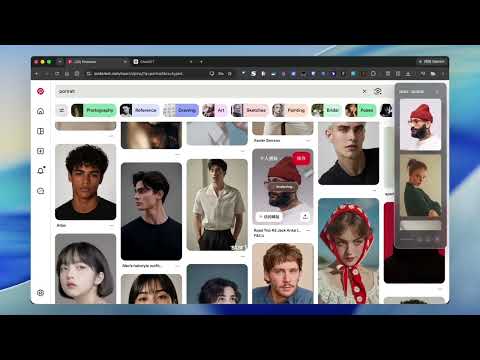
Image to Prompt for AI art — turn any reference image into editable bilingual prompts for Midjourney, Stable Diffusion, and more.

ImgX is an Image to Prompt extension and AI prompt generator for digital creators. Turn any reference image into editable Chinese and English AI art prompts for Midjourney, Stable Diffusion, and other image-generation tools. It analyzes the subject, pose, composition, style, lighting, colors, materials, and other visual details. Then use AI Prompt Rewrite to refine the current prompt with natural-language instructions—for example, change a pose, outfit color, or product detail. ImgX creates prompts; it does not generate images. Features 🖱 Hover over an image, capture a region, or upload a reference. ☁ Built-in Cloud mode is the default — sign in for free credits; no API key required. ✨ AI Prompt Rewrite — refine a prompt with natural-language instructions (Cloud only; 1 credit per submission). 🧠 Structured analysis — visual fields, bilingual prompts, and one-click copy. 📋 Batch queue — process images in parallel with automatic retries. 🔑 Optional BYOK — use your own OpenAI-compatible Vision API endpoint, key, and model for image analysis. Prompt Rewrite requires Cloud mode. Privacy Cloud is the default for new users. After sign-in, ImgX services process your email, credit records, and image-analysis and rewrite requests. Image pixels are used to process a request and are released when processing ends; a small thumbnail is stored only if you explicitly save a favorite. Payment credentials are handled by the payment provider; ImgX keeps only the minimum order records needed for credit settlement. Optional product analytics require your consent. No ads or cross-site tracking. In optional BYOK mode, image-analysis requests go directly from your browser to your chosen provider, and your API key stays on your device. See the privacy policy. Needs For Cloud, sign in with an email. Optional BYOK requires an OpenAI-compatible Vision API endpoint, API key, and model.

Details

  • Version
    1.9.6.6
  • Updated
    November 6, 2026
  • Size
    716KiB
  • Languages
    3 languages
  • Developer
    Website
    Email
    pamler1004@gmail.com
  • Non-trader
    This developer has not identified itself as a trader. For consumers in the European Union, please note that consumer rights do not apply to contracts between you and this developer.

Privacy

Manage extensions and learn how they're being used in your organization

ImgX - Image to Prompt, From Inspiration to Creation has disclosed the following information regarding the collection and usage of your data. More detailed information can be found in the developer's privacy policy.

ImgX - Image to Prompt, From Inspiration to Creation handles the following:

Personally identifiable information
Authentication information
User activity
Website content

This developer declares that your data is

  • Not being sold to third parties, outside of the approved use cases
  • Not being used or transferred for purposes that are unrelated to the item's core functionality
  • Not being used or transferred to determine creditworthiness or for lending purposes

Support

Related

提示词抓取器 (Prompt Catcher)

5.0

悬停网页图片,一键反推 AI 提示词

PromptCard - Image to Prompt AI

4.8

Right-click any image and turn it into detailed prompt analysis in English, Chinese, Japanese, and JSON.

CipherMind - 图片/视频反推提示词

5.0

右键图片或视频,或框选页面区域,将静态图、视频和动态效果反推出可复用的 AI 提示词。

FigmaCN

4.8

中文 Figma 插件,设计师人工翻译校验。

Lovart Clipper - Collect Web Inspiration

5.0

Spot inspiration you love, collect it in one click, and use it right in your Lovart canvas.

ImgPrompt - Image to Prompt

4.1

Image to Prompt

Viko - Image to Prompt & AI Image Generator

4.9

Turn selected web images into prompts and creative variations, then organize results and references.

PinNest AI

5.0

AI design copilot for saving, analyzing, and organizing visual inspiration.

白无常AI 图片提示词与生图助手

4.9

在网页图片上右键提取中英文提示词,并使用用户自备 API Key 生成参考图片。

Anywear: Live Virtual Try-On

3.2

Try on clothes virtually on any fashion website, powered by Decart.

Framia Clipper

5.0

Create with Framia whenever inspiration strikes.

Eagle for Chrome

3.5

This extension makes it easy to save images and save screenshots to Eagle App.

提示词抓取器 (Prompt Catcher)

5.0

悬停网页图片,一键反推 AI 提示词

PromptCard - Image to Prompt AI

4.8

Right-click any image and turn it into detailed prompt analysis in English, Chinese, Japanese, and JSON.

CipherMind - 图片/视频反推提示词

5.0

右键图片或视频,或框选页面区域,将静态图、视频和动态效果反推出可复用的 AI 提示词。

FigmaCN

4.8

中文 Figma 插件,设计师人工翻译校验。

Lovart Clipper - Collect Web Inspiration

5.0

Spot inspiration you love, collect it in one click, and use it right in your Lovart canvas.

ImgPrompt - Image to Prompt

4.1

Image to Prompt

Viko - Image to Prompt & AI Image Generator

4.9

Turn selected web images into prompts and creative variations, then organize results and references.

PinNest AI

5.0

AI design copilot for saving, analyzing, and organizing visual inspiration.

Google apps