


Overview
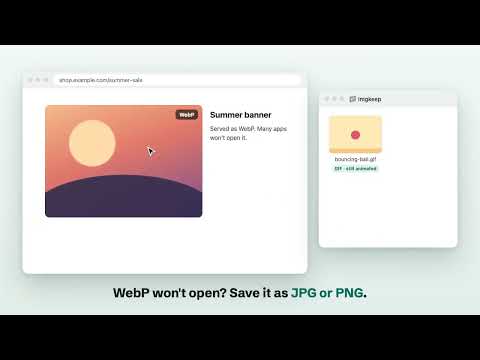
Right-click to save any image as PNG, JPG, WebP or GIF. Converts WebP and AVIF on your device, into your folder. No tracking.
Right-click any image and save it as PNG, JPG or WebP. Imgkeep converts it on your computer and saves it where you want, every time. Sites now serve WebP and AVIF images that many apps won't open. Imgkeep saves WebP as JPG or PNG, and AVIF as JPG or PNG, in one right-click: Imgkeep: Save image as → PNG · JPG · WebP · Original format WHAT IT DOES • Save WebP and AVIF as JPG or PNG: files every app opens. JPGs are saved as .jpg, not .jfif. SVG, GIF (first frame) and data: images work too. • Saves to your folder: choose a folder once and every image goes there, or use Chrome's Downloads, or ask every time. Add subfolders like Imgkeep/{host}. • Your file names: build names from {name}, {host}, {date}, {time}, {w} and {h}, e.g. {name}-{w}x{h}. • Quality you control: JPG and WebP quality sliders, and the background colour for transparent images saved as JPG. • Never overwrites: if a file already exists, Imgkeep adds " (2)" instead of replacing it. BUILT TO BE TRUSTED • No access to your pages: Imgkeep can't read or change the sites you visit. It sees only the image you right-click. • Nothing leaves your computer: images are converted on your device. No uploads, no analytics, no account. • Four permissions only: contextMenus, downloads, storage, offscreen. • Open source under the MIT licence, with no build step, so what you read is what runs. • Free, with no limits: no ads, no review requests, no welcome tabs. A small window opens only when a save needs your OK. WHEN A SITE BLOCKS AN IMAGE A few sites stop other sites from reading their images. Only then, and only when you click "Allow and save", Imgkeep asks Chrome for access to that one site. You can remove it any time in Options. Or choose "Save original format instead". Every feature in Imgkeep today stays free. Ideas and votes: imgkeep.app/ideas.html
0 out of 5No ratings
Details
- Version0.4.0
- UpdatedSeptember 30, 2026
- Size35.7KiB
- LanguagesEnglish
- DeveloperWebsite
Email
helloimgkeep@gmail.com - Non-traderThis developer has not identified itself as a trader. For consumers in the European Union, please note that consumer rights do not apply to contracts between you and this developer.
Privacy

This developer declares that your data is
- Not being sold to third parties, outside of the approved use cases
- Not being used or transferred for purposes that are unrelated to the item's core functionality
- Not being used or transferred to determine creditworthiness or for lending purposes
Support
For help with questions, suggestions, or problems, visit the developer's support site