

IMDownloader | Download story reels highlight image and video

Overview
Download original (high resolution) image, video, reels, story and highlight for Instagram™ with one click, free and unlimited.
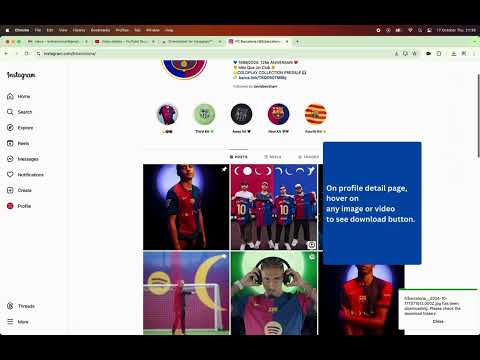
This extension saves photos, videos, reels, stories and highlights in their original quality with one click. Open any profile on the board and download its stories, posts and highlights one by one or all at once. ▣ Features at a glance ● One-click download button on posts, reels, stories and highlights ● The board: search any user and download their stories, posts and highlights, or all of them with Download All ● Pick the files you want, filter them, and see which ones you already downloaded ● Save the sound of a video as an audio file, or its cover as a picture ● Favorites: keep the users you download from most one click away, synced across your browsers ● Multi-picture posts: all of the pictures, or only the one you want ● Folders and file names you choose ● Download history with search and export ● Right-click menu and keyboard shortcuts ● Light and dark mode ● 19 languages ▣ What you can download ● Photos and videos, including every picture of a multi-picture post ● Reels ● Stories and highlights ● Profile pictures in full size ● The sound of a video or reel, as an audio file ● The cover of a video or reel ▣ The download button The extension adds a download button right where you need it: ● Under each post in your feed and on a post page ● On the right side of reels ● In the top-right corner of stories and highlights ● On the thumbnails of a profile, when you hover them On a multi-picture post you choose: all of the pictures, or only the one on screen. ▣ The board Click the extension's icon and a panel opens on the right: ● Search any username, or open a profile and the board follows you there ● See their stories, posts, highlights and profile picture ● Tick the files you want (hold Shift to tick many at once), or download the whole list with Download All ● Filter the list: only photos or videos, only reels, multi-picture posts, or the files you have not downloaded yet ● Files you downloaded before carry a mark ● Click a file to see it large; right-click it to download it, its sound or its cover, or to copy its link ● Download All saves the files, the files with their covers, or only their sound ● Export a list as CSV or JSON, with the caption, date, likes and comments ● Make the board wider, or full screen, and pick small, medium or large tiles ● Add users to your favorites to come back to them quickly ▣ More ways to download ● Right-click a photo or video on the site: download it, the whole post, its sound or its cover, copy its link, or open its owner on the board ● Keyboard shortcut: Alt+Shift+D (Option+Shift+D on a Mac) downloads what is on screen, and Alt+Shift+B opens the board ▣ Your files, your way ● Folders and file names: build them from the username, the media type, the date and more, e.g. IMDownloader/{username}/{mediaType}/{code} ● Image size: the largest one available, or a smaller one ● Download history, kept only on your device (off unless you turn it on), with search and CSV / JSON export ● "Show in folder" right after a download ● Available in 19 languages ▣ Good to know ● No sign-up and no password: it works with the account you are already logged in with ● Private accounts you follow can be downloaded too; nothing you cannot see yourself can be ▣ Free and Pro Downloading with the button, the right-click menu and the shortcuts is free and has no limit. Stories, profile pictures and screenshots on the board are free too. On the free plan, some parts of the board have limits: ● Posts: the first page of a user's posts ● Highlights: the first 10 items of each ● Download All: 10 files a day (stories have no limit) ● Favorites: up to 2 users ● Download history: your last 10 downloads Pro removes these limits, and adds two things the free plan does not have: saving the sound of a video, and exporting a list as CSV or JSON. It is one payment for a year and it does not renew by itself. ▣ Privacy and safety ● Your data stays with you: we never see your account, your password, the profiles you open or what you download ● Files go straight from the site to your computer and pass through no other server: we cannot see them, and we have no wish to ● Your settings, favorites and download history are kept in your browser, never on our servers. Settings and favorites go to your other computers only through your browser's own sync ● No personal data is collected. The most that is sent is anonymous usage statistics, to learn which features are used and where downloads fail ● Every update is reviewed by the browser's own store before it is published, and only then reaches you ▣ Permissions, and why Only what it needs, nothing more: ● Storage: to keep your settings, favorites and download history in your browser ● Context menus: to add the extension's items to the right-click menu ● Downloads (optional): asked for only if you want your files saved into folders and "Show in folder" ● Access to the site and its image servers: to show the download button and fetch the files you download ▣ Getting started After installing, reload the tabs you have open, and pin the extension to your toolbar to open the board with one click. The extension's settings and help page open from the board's header. ▣ Updates and support ● The site changes often, and the extension is updated quickly to keep up with it ● A problem or an idea? Write to us from the Contact tab on the settings page; we read every message Photos and videos belong to the people who posted them. Download only what you have the right to use. This extension is not affiliated with Instagram or Meta.
4.1 out of 5173 ratings
Details
- Version5.1.0
- UpdatedNovember 22, 2026
- Size1.32MiB
- Languages20 languages
- Developer
- Non-traderThis developer has not identified itself as a trader. For consumers in the European Union, please note that consumer rights do not apply to contracts between you and this developer.
Privacy

This developer declares that your data is
- Not being sold to third parties, outside of the approved use cases
- Not being used or transferred for purposes that are unrelated to the item's core functionality
- Not being used or transferred to determine creditworthiness or for lending purposes
Support
For help with questions, suggestions, or problems, please open this page on your desktop browser