

ImageTrans
44 個評分
)
總覽
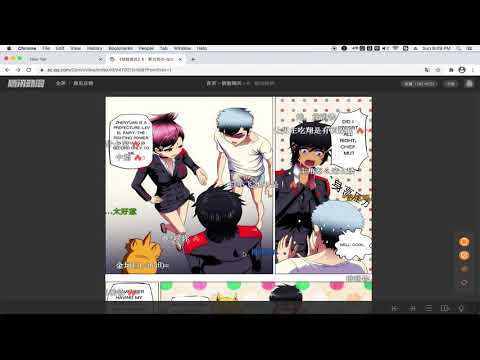
Translate images on websites
An image translator. It uses ImageTrans to translate images on websites whether they are posters, brochures, comics, manga, manhua or webtoon. State-of-art OCR and AI translation services are used to guarantee the translation quality. Usage: 1. Install the extension and ImageTrans. 2. Right click on the image to translate it, which will replace the image with a translated version. 3. If the context menu is disabled, use the shortcut (CTRL+SHIFT+F) to call the popup, use Tab to switch operations and press Enter to perform the operation. It supports automatic image translation and screen capture translation, where it is possible to copy text in images. Detailed guide: https://github.com/xulihang/ImageTrans_chrome_extension It needs ImageTrans by default. You can use PaddleOCR without using ImageTrans but the functions are limited in terms of accuracy, speed, options and language support. You can set up OpenAI API to use ChatGPT, Gemini, etc, for better translation.
1.7 分 (滿分 5 分)44 個評分
詳細資料
- 版本5.2
- 已更新2026年5月14日
- 提供者BasicCAT
- 大小39.05MiB
- 語言2 種語言
- 開發人員BasicCAT
Room 301, Building 19 Haining, Zhejiang 314400 China電子郵件
admin@basiccat.org - 非交易商這位開發人員並未表明自己是交易商。歐盟地區的消費者請注意,消費者權利不適用於你和這位開發人員之間簽訂的合約。
隱私權

這位開發者就你的資料做出下列聲明:
- 除經核准的用途外,不會將你的資料販售給第三方
- 不會基於與商品核心功能無關的目的,使用或轉移資料
- 不會為了確認信用度或基於貸款目的,使用或轉移資料
支援
如有疑問或建議,請使用電腦版瀏覽器開啟這個頁面