

ImageTrans
47 ratings
)
Overview
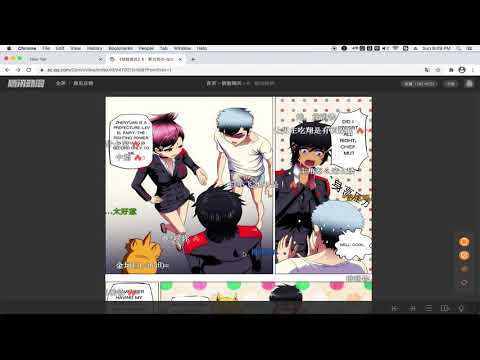
Translate images on websites - supports comic, manga, manhua, webtoon, doujin translation
An image translator. It uses ImageTrans to translate images on websites whether they are posters, brochures, comics, manga, manhua or webtoon. State-of-art OCR and AI translation services are used to guarantee the translation quality. Usage: 1. Install the extension and ImageTrans. 2. Right click on the image to translate it, which will replace the image with a translated version. 3. If the context menu is disabled, use the shortcut (CTRL+SHIFT+F) to call the popup, use Tab to switch operations and press Enter to perform the operation. It supports automatic image translation and screen capture translation, where it is possible to copy text in images. Detailed guide: https://github.com/xulihang/ImageTrans_chrome_extension It needs ImageTrans by default. You can use PaddleOCR without using ImageTrans but the functions are limited in terms of accuracy, speed, options and language support. You can set up OpenAI API to use ChatGPT, Gemini, etc, for better translation. Japanese furigana and Chinese pinyin annotation is also supported for language learning.
1.9 out of 547 ratings
Details
- Version5.92
- UpdatedOctober 22, 2026
- Offered byBasicCAT
- Size58.28MiB
- Languages2 languages
- DeveloperBasicCAT
Room 301, Building 19 Haining, Zhejiang 314400 ChinaEmail
admin@basiccat.org - Non-traderThis developer has not identified itself as a trader. For consumers in the European Union, please note that consumer rights do not apply to contracts between you and this developer.
Privacy

This developer declares that your data is
- Not being sold to third parties, outside of the approved use cases
- Not being used or transferred for purposes that are unrelated to the item's core functionality
- Not being used or transferred to determine creditworthiness or for lending purposes
Support
For help with questions, suggestions, or problems, please open this page on your desktop browser