

Imagery

Overview
Download images from any website individually or as a ZIP file with format and size options.
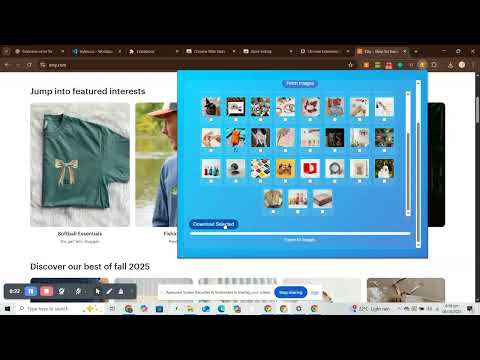
🖼️ Imagery – Download All Images Instantly Imagery is a fast and lightweight bulk image downloader that lets you grab every image from any website — all at once. You can select, resize, and download images individually or export everything together as a ZIP file. 🚀 Key Features 🧩 Download images from any website instantly 📁 Choose format: JPG or PNG 📐 Resize images automatically (Full, Medium 800px, Thumbnail 200px) 📦 Export selected images as a ZIP file ⚡ Fast & lightweight – works in the browser, no servers used 🔒 100% secure – no data collection or tracking 💼 Perfect For Graphic designers and photographers who need to save reference images Marketers collecting product images or ad creatives Developers testing image-heavy pages Anyone who wants to save images from Pinterest, Instagram, or eCommerce sites easily 🧠 Why Imagery is Better Works directly in your browser — no extra software required Automatically filters out duplicates and icons Lets you preview before downloading Supports high-resolution image capture 🔧 How to Use Click the Imagery icon in your Chrome toolbar. Choose image format (JPG / PNG) and size (Full / 800px / 200px). Click Fetch Images to scan the page. Select the ones you want and click Download or ZIP Download. 🛡️ Privacy Imagery runs 100% locally on your computer. It does not collect or send any personal or browsing data. 🧩 Permissions Used downloads – to save images or ZIPs to your computer activeTab – to access the current page and read image URLs 🆕 Future Updates Image filtering by resolution Batch renaming Smart duplicate removal
0 out of 5No ratings
Details
- Version1.0.1
- UpdatedOctober 12, 2025
- Offered byWebzura
- Size12.91KiB
- LanguagesEnglish
- Developer
Email
arrehman.eng15@gmail.com - Non-traderThis developer has not identified itself as a trader. For consumers in the European Union, please note that consumer rights do not apply to contracts between you and this developer.
Privacy

This developer declares that your data is
- Not being sold to third parties, outside of the approved use cases
- Not being used or transferred for purposes that are unrelated to the item's core functionality
- Not being used or transferred to determine creditworthiness or for lending purposes