

Image Translator - Manga, Comics
1 rating
)
Overview
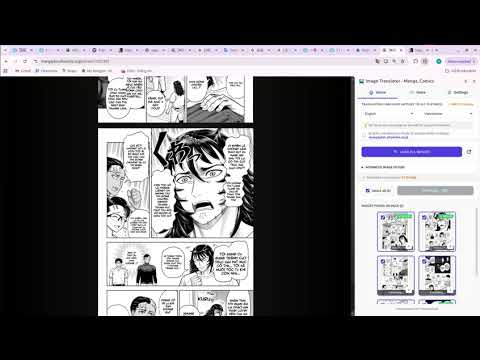
Quickly translate images, comics, manga, manhwa, and webtoons into multiple languages with AI.
# Image Translator - Translate Manga, Webtoon & Comics Instantly with AI Love Manga, Webtoon, Manhwa, or Comics but keep hitting a language wall? **Image Translator** is the sidekick you've been waiting for. Unlike ordinary translation tools, our extension uses advanced AI to detect text, cleanly erase the original lettering, and overlay translations right onto the image, giving you a reading experience that feels like a pro-grade localization. **KEY FEATURES:** **1. Hover to Translate** Just hover over any image on a webpage and a translate button [A/文] pops up. One click, and every bit of text on the image is translated instantly. **2. Manga/Webtoon Reader Mode** An exclusive feature: automatically scans every comic image on the page you're viewing and stitches them into a clean, seamless, ad-free reader. **3. Live Webtoon Mode (Translate as You Scroll)** Webtoon reading has never felt this smooth. Flip this mode on and images get translated on the fly as you scroll. **4. Natural Text Background Removal (Inpainting AI)** - **Standard (Fast):** Built for high-speed reading. - **Advanced (Beautiful):** Smart cloud AI rebuilds the artwork behind the original text, so the cleaned image looks remarkably natural. **5. Text-to-Speech** Eyes getting tired? Let AI read the story aloud. - Supports both system voices and Premium Cloud Voices. - Customize Speed and Pitch. - **Auto-focus:** Highlights the line being read so you can follow along easily. **6. Typography Customization** Not into the default font? Pick your favorite typeface and dial the size up or down to your taste. **7. Smart Cache** Get the most out of your translation quota. Pages you've already translated are saved to the cache, so opening them again loads the translation instantly without using any extra resources. --- **INCREDIBLY EASY TO USE:** - **Method 1:** Hover over an image -> Click the Translate button [A/文] in the top corner. - **Method 2:** Hit "Load All Images" in the control panel to pull an entire chapter into Reader Mode. **WHO IT'S FOR:** - Fans of Japanese Manga, Korean Webtoon/Manhwa, and Western Comics. - Language learners who study through comics. - Scanlation groups that need a fast tool for rough translation drafts. **SECURITY & PRIVACY:** We never store your browsing history or personal images. Data is processed in real time, solely for translation. *Install Image Translator today, break down every language barrier, and dive into the vibrant world of comics.*
5 out of 51 rating
Details
- Version1.0.2
- UpdatedAugust 1, 2026
- Offered byhuyson2nv
- Size3.57MiB
- Languages54 languages
- DeveloperNGUYEN PHU HUY
TỔ 10 NGỌC THUY, LONG BIÊN, HÀ NỘI HÀ NỘI, Hà Nội 11800 VNEmail
contactfreedomshark@gmail.comPhone
+84 839 412 230 - TraderThis developer has identified itself as a trader per the definition from the European Union and committed to only offer products or services that comply with EU laws.
Privacy

Image Translator - Manga, Comics has disclosed the following information regarding the collection and usage of your data. More detailed information can be found in the developer's privacy policy.
Image Translator - Manga, Comics handles the following:
This developer declares that your data is
- Not being sold to third parties, outside of the approved use cases
- Not being used or transferred for purposes that are unrelated to the item's core functionality
- Not being used or transferred to determine creditworthiness or for lending purposes
Support
For help with questions, suggestions, or problems, visit the developer's support site