

Image Resizer – Resize, Convert & Optimize by UnifyBrowse

Overview
Resize, convert and compress images locally. Target sizes, focal-point crop, packs, profiles. Images never leave your device.
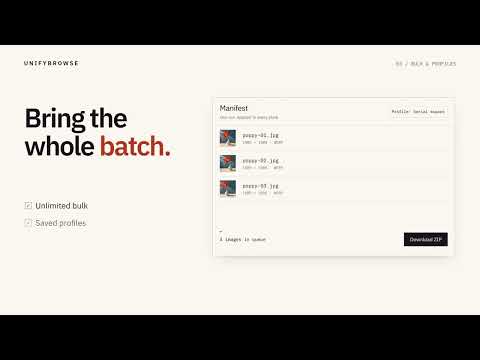
Image Resizer - Resize, Convert, Edit & Compress Images Resize, edit, convert, and compress images directly in your browser. Image Resizer processes everything locally on your device, so your images are never uploaded to an external server. No account is required to get started. KEY FEATURES • Full Photo Editor - Drag-crop by hand, rotate in quarter turns, flip, and straighten with a −45° to 45° slider - all with 50 steps of undo/redo. Edits are saved automatically per image, so closing the tab never loses your work. • Annotate Your Images - Arrows, boxes, ovals, freehand drawing, and a highlighter, anchored to the image itself so marks stay in place through crops, rotations, and resizes. • Tone Adjustments - Brightness, contrast, and saturation with a live preview. • Text Labels (Pro) - Add captions that stay upright even on a flipped or rotated image. • True Redaction (Pro) - Blur or pixelate that resamples the underlying pixels, so the original content is gone from the exported file - not just covered up. • Precise Image Resizing - Set exact width and height dimensions, with an optional aspect-ratio lock. Supports dimensions up to 16,000 × 16,000 pixels. • 22 Ready-Made Presets - Quickly resize images using presets for common publishing and content formats. • Three Resize Modes - Choose Stretch, Fit, or Crop with a live preview of the result. • Focal-Point Cropping - Use a 9-point positioning system to control which part of your image remains visible. • Target File Size - Set a maximum file size, such as 200 KB, and let the extension automatically adjust image quality. • Format Conversion - Convert images between JPG, PNG, and WebP with an adjustable quality setting. • HEIC & HEIF Support - Open images directly from your iPhone, alongside TIFF and BMP formats. • Custom Background Colors - Choose white, black, transparent, or a custom HEX color when using Fit mode. • Bulk Image Processing - Process multiple images in one session and download the results together in a ZIP archive. • Saved Profiles - Save your preferred settings and reuse them whenever you need them. • Flexible Image Import - Add images using drag and drop, the file picker, clipboard paste, or the browser's right-click context menu. • Light & Dark Themes - Choose the appearance that works best for you. PRIVACY FIRST - YOUR IMAGES STAY LOCAL Image Resizer processes and edits images directly on your device, using the browser's OffscreenCanvas API in a Web Worker. Your images, edits, and annotations are never uploaded to our servers or sent to third-party services. The extension does not request permission to read the pages you visit. • No image uploads. • No analytics. • No telemetry. • No tracking scripts. Your files stay on your device. FREE & PRO Image Resizer offers a fully functional free version with no trial period. Free Features: • All 22 image presets. • Image resizing with Stretch, Fit, and Crop modes. • The full photo editor - drag-crop, rotate, flip, straighten, and undo/redo. • All annotation tools - arrows, boxes, ovals, freehand, and the highlighter. • Brightness, contrast, and saturation adjustments. • Focal-point positioning and target file size compression. • JPG, PNG, and WebP conversion. • HEIC, HEIF, TIFF, and BMP support. • Up to 5 images per batch. • Up to 3 saved profiles. Pro Features: Pro is a one-time purchase with no recurring subscription. • Text Labels - Add captions to your images. • True Redaction - Blur or pixelate that permanently removes the original pixels, not just covers them. • Export Packs - Generate multiple versions of an image using selected presets in a single operation. • Unlimited Batch Processing - Process as many images as you need. • More Saved Profiles - Save up to 20 custom configurations. • Flexible Activation - Activate Pro on multiple browsers you own. If you add a text label or a redaction while on Free, the editor lets you know before you export - and keeps your work saved, so upgrading later restores it instead of making you redo it. WHO IS IT FOR? Image Resizer is designed for anyone who regularly works with images. Whether you're a content creator preparing images for different publishing channels, a developer optimizing screenshots, an online seller meeting image upload requirements, or someone who needs to crop, annotate, redact, or shrink a photo - Image Resizer makes the process simple. No complicated editing software. No unnecessary uploads. Just a fast, convenient image editor built into your browser. Made by UnifyBrowse Website: https://unifybrowse.com/ Support: support@unifybrowse.com
5 out of 54 ratings
Details
- Version1.1.0
- UpdatedNovember 16, 2026
- FeaturesOffers in-app purchases
- Size1.12MiB
- LanguagesEnglish
- DeveloperWebsite
Email
devchrome@outlook.com - Non-traderThis developer has not identified itself as a trader. For consumers in the European Union, please note that consumer rights do not apply to contracts between you and this developer.
Privacy

This developer declares that your data is
- Not being sold to third parties, outside of the approved use cases
- Not being used or transferred for purposes that are unrelated to the item's core functionality
- Not being used or transferred to determine creditworthiness or for lending purposes
Support
For help with questions, suggestions, or problems, visit the developer's support site