


Genel bakış
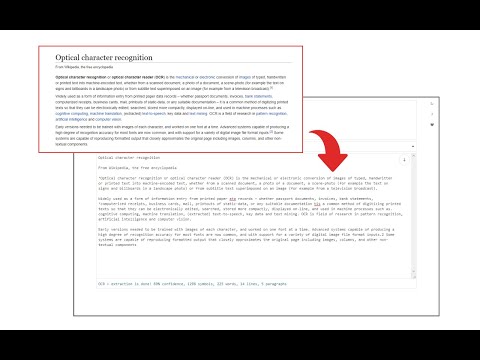
Easily get words out of an image with OCR engine!
Image Reader (OCR) extension helps you easily get words out of any image. It uses two different open-source OCR engines. The 1st engine is called Tesseract. Tesseract.js is an open-source JavaScript library and is made via an Emscripten port of the famous Tesseract OCR Engine written in C and C++. Please visit (https://github.com/naptha/tesseract.js) to get more info. The 2nd engine, called Granite Docling, is developed by IBM (https://huggingface.co/ibm-granite/granite-docling-258M). Please note that when you choose IBM Granite Docling, the app needs to download training data (~1200MB) for the AI engine. So please be patient while it is loading. To work with this addon, simply open the addon's interface and load your image via the file selector (top section). Before using the addon, please make sure to select the appropriate OCR engine and language. For Tesseract, the default OCR language is set to English. For Granite Docling, you do not need to set a language; just select the desired backend (CPU or GPU) and wait for the app to load completely. Note: For the Tesseract OCR engine, this addon uses the "https://github.com/naptha/tessdata/tree/gh-pages/" GitHub repo to fetch language data required for the OCR operation. For the IBM Granite Docling, it uses "https://huggingface.co/onnx-community/granite-docling-258M-ONNX" to fetch training data required for the OCR operation. Both language data packs are very large and cannot be included in the addon package. To report bugs, please fill out the bug report form on the extension's homepage (https://mybrowseraddon.com/image-reader.html).
5 üzerinden 3,627 puan
Ayrıntılar
- Sürüm0.2.0
- Güncellenme tarihi:10 Kasım 2025
- Sunan:Sevina
- Boyut13.19MiB
- DillerEnglish
- Geliştirici
E-posta
sevina.lucia@gmail.com - Tacir olmayanBu yayıncı kendisini tacir olarak tanımlamamış. Avrupa Birliği'ndeki tüketiciler açısından bakıldığında, bu geliştiriciyle yapmış olduğunuz sözleşmelerde tüketici haklarının geçerli olmadığını lütfen unutmayın.
Gizlilik

Bu geliştirici, verilerinizle ilgili olarak aşağıdakileri beyan eder:
- Onaylanan kullanım alanları dışında üçüncü taraflara satılmaz
- Öğenin temel işleviyle alakasız amaçlar için kullanılmaz ya da aktarılmaz
- Kredibilitenin belirlenmesi veya borç verme amaçlarıyla kullanılmaz ya da aktarılmaz
Destek
Sorular, öneriler veya sorunlarla ilgili yardım için geliştiricinin destek sitesini ziyaret edin.